
Using LLMs
Using AI to integrate Wert
Wert documentation is now AI-enhanced. Whether you’re using ChatGPT, Claude, or a custom LLM integration, we’ve made it easy to feed Wert docs directly into your models and even easier to obtain relevant answers.
DisclaimerWhile LLMs are powerful tools for interpreting documentation, they may occasionally generate inaccurate or outdated code snippets. Always verify AI-generated implementation details against the official Wert documentation or Technical Support Staff before deploying to production.
LLM Files
To help LLMs stay current on how Wert works, we expose several specialized files for ingestion:
- llms.txt — A concise, curated list of top-level documentation pages, ideal for smaller models or fast context building.
- llm-general.md — Covers all documentation outside of specific widget or backend integrations, including overview, FAQs, and troubleshooting for payment, KYC, and SMS flows in sandbox and production environments.
- llm-backend-integration.md — Focused context for integrating webhooks and backend APIs.
- llm-nft-checkout.md — Guides and references for integrating our NFT and smart contract checkout widgets.
- llm-on-ramp.md — Technical reference for embedding our standard on-ramp widget on your website.
Copy the relevant file content directly into your prompt, or feed these files into your custom GPTs and AI workflows to keep technical answers accurate.
Tips to Prevent LLM Hallucinations
To get the most accurate results and prevent the LLM from losing context during integration:
- Start fresh per task: Open a new chat session for each distinct task or module (e.g., one chat for setting up webhooks, another for frontend widget initialization, or another to ask questions about payment/KYC/SMS issues).
- Pin critical guardrails: Even when attaching a reference file at the start, add a strict prompt rule:
"Answer strictly based on the provided documentation file. If an answer or parameter isn't explicitly mentioned, state that you don't know rather than guessing."
- Prevent context drift: Over long conversation threads, models can lose track of attached files and begin generating generic or inaccurate code.
- If you notice responses drifting, re-paste the relevant
.mdfile content directly into your latest prompt to re-anchor the context. - For complex implementations, ask the model to summarize its working solution, start a new chat, and pass both the summary and the original documentation file to continue safely.
- If you notice responses drifting, re-paste the relevant
Targeted Page Context
For more granular queries, you can feed a specific page’s link or its raw text directly into your LLM. This is the most efficient way to get precise technical answers for a single integration step without over-saturating the model's context window.
You can provide context in two ways:
-
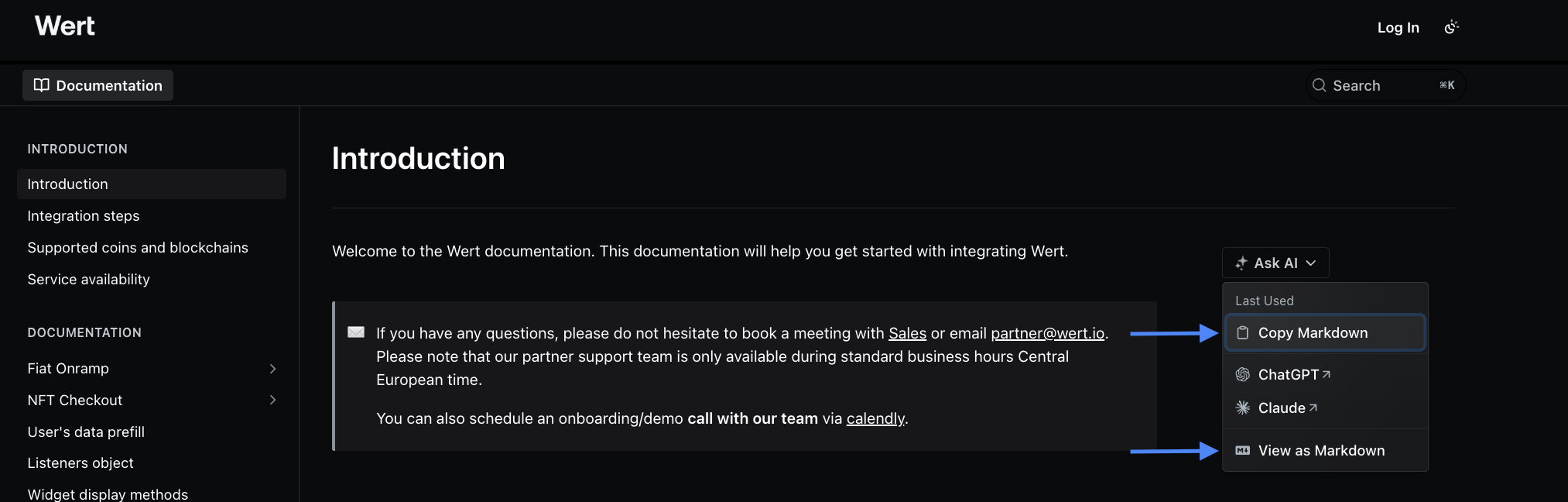
Share the Markdown Link: Open the URL of any specific documentation page by clicking on "View as Markdown" and provide the content to LLMs with web-browsing capabilities. See image below.
-
Copy Markdown: Use the "Copy Markdown" feature on any page to grab the raw Markdown text and paste it directly into your chat.
Updated 3 months ago