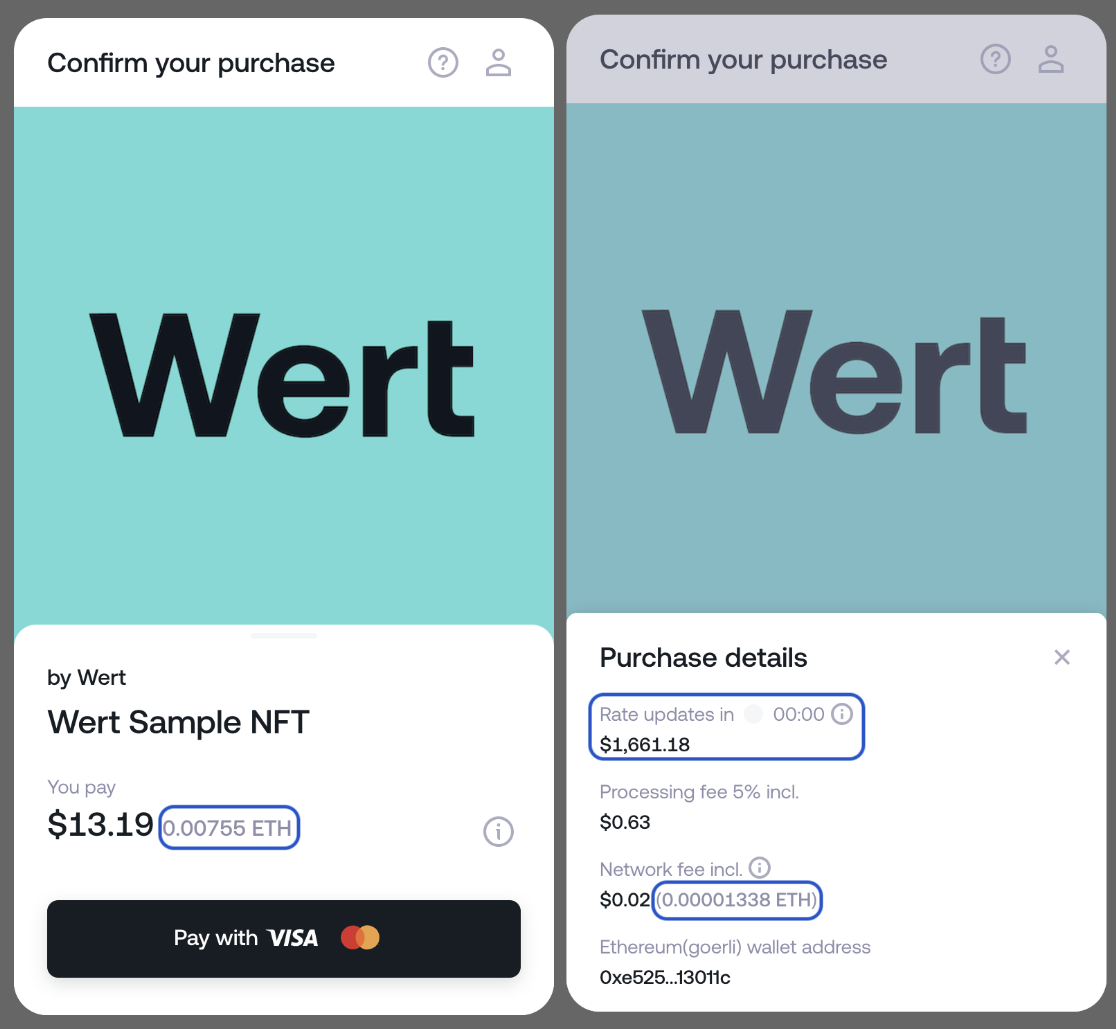
# LLM Full ```` # Wert Documentation & Configuration # Table of Contents 1. [Documentation/_order.yaml](#Documentation-_order-yaml) 2. [Documentation/customisation-package.md](#Documentation-customisation-package-md) 3. [Documentation/data-prefill.md](#Documentation-data-prefill-md) 4. [Documentation/fiat-onramp/_order.yaml](#Documentation-fiat-onramp-_order-yaml) 5. [Documentation/fiat-onramp/extra-object-fiat-onramp.md](#Documentation-fiat-onramp-extra-object-fiat-onramp-md) 6. [Documentation/fiat-onramp/index.md](#Documentation-fiat-onramp-index-md) 7. [Documentation/fiat-onramp/limiting-assets-in-the-widget.md](#Documentation-fiat-onramp-limiting-assets-in-the-widget-md) 8. [Documentation/listerners-object.md](#Documentation-listerners-object-md) 9. [Documentation/nft-checkout/_order.yaml](#Documentation-nft-checkout-_order-yaml) 10. [Documentation/nft-checkout/extra-object-item-checkout.md](#Documentation-nft-checkout-extra-object-item-checkout-md) 11. [Documentation/nft-checkout/generate-signed-data.md](#Documentation-nft-checkout-generate-signed-data-md) 12. [Documentation/nft-checkout/index.md](#Documentation-nft-checkout-index-md) 13. [Documentation/nft-checkout/limiting-fiat-currencies.md](#Documentation-nft-checkout-limiting-fiat-currencies-md) 14. [Documentation/nft-checkout/simplifying-the-ui.md](#Documentation-nft-checkout-simplifying-the-ui-md) 15. [Documentation/widget-display-methods.md](#Documentation-widget-display-methods-md) 16. [Guides/_order.yaml](#Guides-_order-yaml) 17. [Guides/forming-input-data.md](#Guides-forming-input-data-md) 18. [Guides/generating-a-keypair.md](#Guides-generating-a-keypair-md) 19. [Guides/passing-apple-store-review.md](#Guides-passing-apple-store-review-md) 20. [Guides/signing-a-payment-request.md](#Guides-signing-a-payment-request-md) 21. [Guides/token-support.md](#Guides-token-support-md) 22. [Guides/verifying-your-smart-contract.md](#Guides-verifying-your-smart-contract-md) 23. [Introduction/_order.yaml](#Introduction-_order-yaml) 24. [Introduction/integration-steps.md](#Introduction-integration-steps-md) 25. [Introduction/introduction.md](#Introduction-introduction-md) 26. [Introduction/service-availability.md](#Introduction-service-availability-md) 27. [Introduction/supported-coins-and-blockchains.md](#Introduction-supported-coins-and-blockchains-md) 28. [Reference/_order.yaml](#Reference-_order-yaml) 29. [Reference/converter.md](#Reference-converter-md) 30. [Reference/data-api.md](#Reference-data-api-md) 31. [Reference/error-codes.md](#Reference-error-codes-md) 32. [Reference/webhooks.md](#Reference-webhooks-md) 33. [Support and FAQ/_order.yaml](#Support and FAQ-_order-yaml) 34. [Support and FAQ/embed-test.md](#Support and FAQ-embed-test-md) 35. [Support and FAQ/general-faq.md](#Support and FAQ-general-faq-md) 36. [Support and FAQ/smart-contract-faq.md](#Support and FAQ-smart-contract-faq-md) 37. [Testing/_order.yaml](#Testing-_order-yaml) 38. [Testing/going-live.md](#Testing-going-live-md) 39. [Testing/sandbox.md](#Testing-sandbox-md) 40. [_order.yaml](#_order-yaml) *** ### FILE: Documentation/_order.yaml Type: YAML ID: Documentation-_order-yaml --- CONTENT START --- * fiat-onramp * nft-checkout * data-prefill * listerners-object * widget-display-methods * customisation-package --- CONTENT END --- *** ### FILE: Documentation/customisation-package.md Type: MD ID: Documentation-customisation-package-md --- CONTENT START --- *** title: Customisation Package deprecated: false hidden: false metadata: robots: index ------------- # **WERT — Branding & Customization** _Available as a paid add-on_ We offer partners the ability to adapt the Wert user experience to their own brand while maintaining full product functionality. ### **What’s included in the customization package** * **Custom email templates** — modify text and visuals to match your brand identity. * **Personalized SMS OTP sender** — set your brand name as the sender for one-time passcodes. * **Branded banking descriptor** — customize the name shown on your customers’ bank statements. *** ### **How it works** 1. **Select your customization options** * Email templates * SMS OTP sender name * Banking descriptor 2. **We share the templates** You’ll receive editable files where you can make changes to copy and design. 3. **Review & launch** Once you approve the changes, we’ll implement them and confirm when everything is live. *** ### **What can be customized** * Logos and brand colors in emails * Email and notification text * Sender domain for emails (Wert or custom domain) * SMS sender name * Banking descriptor displayed on bank statements **Mandatory elements** Each email will include standard Wert legal information as required by regulators. *** ### **Timeline & pricing** * Pricing — available upon request (paid add-on). * Implementation time — typically 1 week after receiving all materials. *** ### See it in action **Emails** Wert Default Email - Your Branded Email **SMS OTP** *Wert Default OTP - Branded OTP* **Banking descriptor** _Wert → "Wert*YourBrand"_ 📩 Ready to unlock the full potential? Contact your Wert account manager to begin customizing today. --- CONTENT END --- *** ### FILE: Documentation/data-prefill.md Type: MD ID: Documentation-data-prefill-md --- CONTENT START --- *** title: User's data prefill excerpt: '' deprecated: false hidden: false metadata: title: '' description: '' robots: index next: description: '' pages: * type: basic slug: fiat-onramp title: Fiat Onramp * type: basic slug: nft-checkout title: NFT Checkout *** To simplify the purchase flow for your users, you can pass some of their details directly to Wert upon widget initialization. You are always in control of how much data you pass. You can provide ‘Know Your Customer’ information for faster user verification or just a phone number. The fields you can pass are:
Property Data Type Description Possible values
full_name string The user’s first and last name. Between 3 and 69 letters. RegExp(/(\w+\s)\w+/)
date_of_birth string User’s date of birth. DD/MM/YYYY MM/DD/YYYY (for USA)
phone string User’s phone number in international format (E. 164 standard). The ‘+’ is optional. +11014321111
email string User’s email address. [test@test.com](mailto:test@test.com)
country_of_residence string User’s country of residence. alpha2 code of the country
state_of_residence string User’s state of residence (for USA). alpha2 code of USA state
```javascript const widget = new WertWidget({ partner_id: "YOUR_PARTNER_ID", phone: "+494949030", email: "test@test.io", full_name: "Name Surname", date_of_birth: "31/07/1990", country_of_residence: "DE", }); ``` As a result, the user will not need to enter the data you provide to us manually, but they will always have the option to correct any information. The Widget will load with pre-filled information on the following screens: Enter phone number Card details Personal details For US users, the screens will display as follows: Left to right: 'Enter phone' screen, 'Card details' screen and 'Personal details' screen --- CONTENT END --- *** ### FILE: Documentation/fiat-onramp/_order.yaml Type: YAML ID: Documentation-fiat-onramp-_order-yaml --- CONTENT START --- * limiting-assets-in-the-widget * extra-object-fiat-onramp --- CONTENT END --- *** ### FILE: Documentation/fiat-onramp/extra-object-fiat-onramp.md Type: MD ID: Documentation-fiat-onramp-extra-object-fiat-onramp-md --- CONTENT START --- *** title: Multiple addresses excerpt: '' deprecated: false hidden: false metadata: title: '' description: '' robots: index next: description: '' pages: * type: basic slug: widget-initialisation-top-up title: Fiat Onramp * type: basic slug: supported-coins-and-blockchains title: Supported coins and blockchains *** # The `extra` object The `extra` object can pass multiple wallets to the widget so the customer can switch between cryptocurrencies during the purchase without manually entering a different wallet address. When passing wallet addresses in the `extra` object, please keep in mind that: * Users can always edit the pre-filled addresses. * Addresses will remain pre-filled if the user switches between cryptocurrencies. * If you provide addresses for the main cryptocurrency in both the `address` option and the `extra` object, the one in `address` will be pre-filled. * The `extra` object only functions with [our SDK](https://www.npmjs.com/package/@wert-io/widget-initializer). Please ensure you pass the correct values in `commodities` and `wallets.` You can find `commodity` values in [Supported Coins and Blockchains](https://docs.wert.io/docs/supported-coins-and-blockchains). # The wallet object structure You can define an array of default wallets that will be pre-filled when the user switches between cryptocurrencies. | Property | Type | Description | | :------- | :----- | :------------------------------------------------------------------------------------------------------------------------------- | | name | string | Example: `ETH`, please refer to the [list of supported currencies](https://docs.wert.io/docs/supported-coins-and-blockchains). | | network | string | Example: `ethereum`, please refer to [list of supported currencies](https://docs.wert.io/docs/supported-coins-and-blockchains). | | address | string | The user's wallet address. Non-valid addresses will be ignored. | `Extra` object structure: ```javascript extra: { item_info: Object, wallets: Array, } ``` # Examples 1. You can provide the required crypto asset and the user's address if it's a single-wallet address. The widget will load with the provided address:
Example of providing a single wallet address:
```javascript const wertWidget = new WertWidget({ // ... other properties commodity: "XTZ", network: "tezos", address: "tz1LjQKVfHCCCYm8DDYKPzL5w4nCtobiZmSr", commodities: JSON.stringify([ { commodity: "XTZ", network: "tezos", }, ]), }); ```
2. You can display all commodities in the widget but provide addresses only for some:
Example of providing addresses for some commodities:
In the example below three addresses will be pre-filled, the user can manually enter other addresses. ```javascript const options: Options = { // ... other properties currency: 'USD', commodity: 'ETH', network: 'ethereum', extra: { wallets: [ { name: "ETH", // case-ignored network: "ethereum", // case-ignored address: "0x0E976df9bb3ac63F7802ca843C9d121aE2Ef22ee", }, { name: "XTZ", // case-ignored network: "tezos", // case-ignored address: "tz1LjQKVfHCCCYm8DDYKPzL5w4nCtobiZmSr", }, { name: "MATIC", // case-ignored network: "polygon", // case-ignored address: "0x0E976df9bb3ac63F7802ca843C9d121aE2Ef22ee", }, ], }, }; ```
3. You can hide certain commodities in the widget and display only specific ones and their corresponding addresses. The widget will load with the selected commodities and pre-filled addresses:
Example of hiding some commodities and providing addresses for the selected ones:
```javascript const wertWidget = new WertWidget({ // ... other properties commodities: JSON.stringify([ { commodity: "ETH", network: "ethereum", }, { commodity: "XTZ", network: "tezos", }, { commodity: 'MATIC', network: 'polygon', }, ]), extra: { wallets: [ { name: "ETH", // case-ignored network: "ethereum", // case-ignored address: "0x0E976df9bb3ac63F7802ca843C9d121aE2Ef22ee", }, { name: "XTZ", // case-ignored network: "tezos", // case-ignored address: "tz1LjQKVfHCCCYm8DDYKPzL5w4nCtobiZmSr", }, { name: "MATIC", // case-ignored network: "polygon", // case-ignored address: "0x0E976df9bb3ac63F7802ca843C9d121aE2Ef22ee", }, ], }, }); ```
--- CONTENT END --- *** ### FILE: Documentation/fiat-onramp/index.md Type: MD ID: Documentation-fiat-onramp-index-md --- CONTENT START --- *** title: Fiat Onramp excerpt: '' deprecated: false hidden: false metadata: title: '' description: '' robots: index next: description: '' pages: * type: basic slug: widget-display-methods title: Widget display methods * type: basic slug: listerners-object title: Listeners object * type: basic slug: supported-coins-and-blockchains title: Supported coins and blockchains * type: basic slug: extra-object-fiat-onramp title: Multiple addresses *** # 📄 Session-Based Integration Wert’s fiat onramp is initialised through a session-based integration flow, designed to give you full control over the transaction experience. This flow consists of two simple steps: 1. Create a session via API, including all necessary transaction and user details 2. Initialise the widget using the session_id returned from the API This allows you to tailor how the onramp behaves — from fully user-driven to fully preconfigured — depending on your use case. # 1. Create session Please click on the dropdown below to see how to create session_id from our API. To start the widget, you must create a new session via our Partner API. The available endpoints for this are:
Environment URL Method
`Sandbox` `https://partner-sandbox.wert.io/api/external/hpp/create-session` `POST`
`Production` `https://partner.wert.io/api/external/hpp/create-session` `POST`

## Authentication To authenticate your requests, include your API key in the HTTP header of every request.
Header Key Value
X-Api-Key `your-unique-api-key`

Your API Key carries many privileges, so be sure to keep it secure!

Your API key is provided exclusively by Wert during onboarding. Store this safely in your backend. Never share your key; if you suspect a compromise, contact us immediately to issue a new one.

Note: Sandbox and Production keys are unique to their respective environments and are not interchangeable.
## Parameters flow\_type: simple\_full\_restrict ensures all parameters are locked and cannot be edited by users.
Property Required Description Data Type Default value Possible values
flow\_type Yes Determines widget behaviour. simple: Users choose. simple\_full\_restrict: Partner defined options. string simple simple, simple\_full\_restrict
user\_id No The User ID for the associated profile string - 01KQWHEJNSY
commodity \* Default crypto asset selected. string BTC See docs
commodity\_amount \* Pre-filled crypto amount (ignored if currency\_amount set). numeric - -
network \* Network for the default asset. string bitcoin See docs
wallet\_address \* User’s wallet address. Validated based on commodity. string - -
currency \* Fiat currency (required if currency\_amount used). EUR is not available in sandbox. string - USD, EUR
currency\_amount \* Pre-filled fiat amount ($1 min / $30 min for BTC). numeric - -
  • (\*) Requirement: All properties marked with an asterisk are required when flow\_type is set to `simple_full_restrict`.
  • Use either `commodity_amount` or `currency_amount`, but not both.

## Examples ```curl cURL curl -X POST "https://partner-sandbox.wert.io/api/external/hpp/create-session" \ -H "X-Api-Key: YOUR_API_KEY" \ -H "Content-Type: application/json" \ -d '{ "flow_type": "simple", // flow_type is always required }' ``` ```curl cURL curl -X POST "https://partner-sandbox.wert.io/api/external/hpp/create-session" \ -H "X-Api-Key: YOUR_API_KEY" \ -H "Content-Type: application/json" \ -d '{ "flow_type": "simple_full_restrict", "wallet_address": "0xd8dA6BF26964aF9D7eEd9e03E53415D37aA96045", "currency": "USD", "commodity": "TT", "network": "amoy", "currency_amount": 100.50 }' ``` In sandbox, please use only USD and [sandbox commodities](https://docs.wert.io/docs/supported-coins-and-blockchains#sandbox)
## Responses 200 (OK)}> ```json { "sessionId": "string", "requestId": "string" } ``` 400 (Missing required fields)}> ```json { "message": "Invalid request: wallet_address and either commodity_amount or currency_amount must be specified." } ``` 401 (Unauthorized request)}> ```json { "message": "Unauthorized: API key is missing or invalid." } ``` The `sessionId` is valid for 30 seconds after being created and can only be used once. # 2. Initialise the widget You can integrate the Wert Widget into your web app using [our SDK](https://www.npmjs.com/package/@wert-io/widget-initializer), **this is the recommended way to initialise the widget**. For React projects, we provide [this wrapper](https://www.npmjs.com/package/@wert-io/module-react-component). You can find **examples** of the integration on [GitHub](https://github.com/wert-io/widget-integration-example). Once the SDK is installed, you can use the following code snippet to initialize the payment module: ```typescript JavaScript // Import the SDK import WertWidget from '@wert-io/widget-initializer'; import type { Options } from '@wert-io/widget-initializer/types'; // Initialize the payment module const options: Options = { partner_id: 'YourPartnerID', session_id: 'SessionID', // session id recieved from partner.wert.io/api/ origin: 'https://sandbox.wert.io', // this option needed only in sandbox } const wertWidget = new WertWidget(options); wertWidget.open(); // Further code to handle widget events and interactions ``` # Options Here are the options you can pass to the widget. ## General options {`
Property Required Description Data Type Default value Possible values
partner_id Yes Provided when you register as a partner. string - -
session_id Yes session_id returned from the API string - -
origin In sandbox Initializes the module in a sandbox/production environment. string https://widget.wert.io https://sandbox.wert.io
click_id No A unique identifier created by you. Can be used to help you reconcile the order on your side. string click_id uuid_v4(). Try to avoid using special characters like % or pass them encoded.
phone No User’s phone number in international format (E.164 standard). The ‘+’ is optional. string - +11014321111
redirect_url No Includes a button 'Back to {Partner Name}' (not available in iFrame). Also redirects users from KYC emails. string - https://origin.us/item_id
support_url No Used for helping users with failed orders. string - https://partner.com/support
listeners No Used to listen to module events and react to them. object - See the listeners object.
commodities No Stringified JSON array of objects with commodity and network options. string By default, all assets are displayed. See Limiting assets
extra No Passing multiple wallet addresses to the widget. string - See Multiple addresses
payment_method No Pre-selected payment method shown first in the list. string card card, apple-pay, google-pay, sepa
payment_method_restriction No If true, shows only the method specified in payment_method. boolean false true, false
display_currency No ISO currency code to display approximate estimated amounts. string - AUD, SGD, HKD, THB, MYR, VND

hide_fee_breakdown

No

Hides fee details for all payment methods and only the fee value is shown.

boolean

false

true
false

`}
## Pre-filled user data {` country code.
Property Required Description Data Type Default value Possible values
country_of_residence No User’s country of residence. string - alpha2 code of the country
state_of_residence No User’s state of residence (for USA). string - alpha2 code of the state
date_of_birth No User’s date of birth. string - DD/MM/YYYY
MM/DD/YYYY (USA)
email No User’s email address. string - test@test.com
full_name No The user’s first and last name. string - min 3, max 69 letters; RegExp(/(\w+\s)\w+/)
card_country_code No Card billing address alpha2 code of the countrystring - US
card_city No Card billing address city. string - Los Angeles
card_state_code No Card billing address alpha2 state code (For US). string - CA
card_post_code No Card billing address postal code. string - 12345
card_street No Card billing address street. string - Main street 1
`}
## Appearance and restrictions {`
Property Required Description Data Type Default value Possible values
lang No Language of the widget. string en **
skip_init_navigation No By default, the module suggests the nearest purchase route. Setting to true skips this logic. boolean undefined true
theme No Module’s theme color. string undefined dark
brand_color No Custom brand color for primary buttons, tooltips, steppers, tabs, checkboxes, toasts, and pie countdowns. string - #FF0000
`}
(**) **Supported Languages**: `en` - English, `fr` - French, `ja` - Japanese, `es` - Spanish, `ko` - Korean, `zh` - Chinese, `tr` - Turkish --- CONTENT END --- *** ### FILE: Documentation/fiat-onramp/limiting-assets-in-the-widget.md Type: MD ID: Documentation-fiat-onramp-limiting-assets-in-the-widget-md --- CONTENT START --- *** title: Limiting assets on the widget excerpt: '' deprecated: false hidden: false metadata: title: '' description: '' robots: index next: description: '' --------------- By default, all assets are displayed when the widget is loaded. You can, however, limit the available cryptocurrencies to display only one or several in the 'You get' drop-down list. 1. Default view with all assets: 2. Displaying one asset can be useful for single-currency wallets: Pass the following data to load the Widget with a single cryptocurrency: ```javascript const wertWidget = new WertWidget({ // ... other options ... commodity: "XTZ", network: "tezos", commodities: JSON.stringify([ { commodity: "XTZ", network: "tezos", }, ]), }); ``` 3. You can show several commodities as well In order to do so, pass the following data to Wert upon initialization: ```javascript const wertWidget = new WertWidget({ // ... other options ... commodity: "BTC", network: "bitcoin", commodities: JSON.stringify([ { commodity: "BTC", network: "bitcoin", }, { commodity: "ETH", network: "ethereum", }, ]), }); ``` Make sure to pass the correct `commodity` and `network` options for this feature to work. You can find them in the [List of supported coins and blockchains](https://docs.wert.io/docs/supported-coins-and-blockchains) --- CONTENT END --- *** ### FILE: Documentation/listerners-object.md Type: MD ID: Documentation-listerners-object-md --- CONTENT START --- *** title: Listeners object excerpt: '' deprecated: false hidden: false metadata: title: '' description: '' robots: index next: description: '' pages: * type: basic slug: widget-initialisation-top-up title: Top-up Module Widget * type: basic slug: nft-module-widget title: NFT Checkout * type: basic slug: widget-display-methods title: Widget display methods * type: basic slug: error-codes title: Error codes *** The listeners object helps you keep track of events in the module and respond accordingly. The following events are available:
Event Expected data Description
close undefined It's triggered when the user closes a widget.
error \{ name: String; message: String; } Widget error message (not payment-related), see [error codes.](https://docs.wert.io/docs/error-codes)
loaded undefined It indicates the module is loaded with necessary data and ready to receive extra data if needed. This event may duplicate if the user is redirected to their bank's 3-D Secure verification page.
payment-status \{ status: String payment_id: String order_id: String tx_id: String // if available } Possible statuses:  `pending`, `canceled`, `failed`, `success`, `failover`. Events may not be unique for each status. `tx_id` appears in the `pending` status.
position \{ step: String } Notifies changes in user flow position. const names = \{ account: 'account', accountHistory: 'account-history', accountCard: 'account-card', accountAddress: 'account-address', home: 'home', wallet: 'wallet', login: 'login', onboarding: 'onboarding', card: 'card', verification: 'verification', verificationStatus: 'verification-status', orderReview: 'order-review', orderStatus: 'order-status', warranty: 'warranty', error: 'error', };
rate-update \{ ticker: String, fee_percent: String, currency_amount: String, fee_amount: String, commodity_amount: String, purchase_amount: String, miner_fee: String, currency_miner_fee: String } Updates when the widget rate changes. We fix the exchange rate for 30 seconds.
Add the listeners object like this: the key is the event type, and the value is your callback function. ```javascript const widget = new WertWidget({ ...options, listeners: { position: (data) => console.log("step:", data.step), }, }); ``` To subscribe to the payment status data, you can do the following: ```javascript const widget = new WertWidget({ ...options, listeners: { 'payment-status': data => console.log('Payment status:', data) }, }); ``` This will only be triggered when simulating the purchase, not in intermediary steps. --- CONTENT END --- *** ### FILE: Documentation/nft-checkout/_order.yaml Type: YAML ID: Documentation-nft-checkout-_order-yaml --- CONTENT START --- * generate-signed-data * extra-object-item-checkout * simplifying-the-ui * limiting-fiat-currencies --- CONTENT END --- *** ### FILE: Documentation/nft-checkout/extra-object-item-checkout.md Type: MD ID: Documentation-nft-checkout-extra-object-item-checkout-md --- CONTENT START --- *** title: Adding item information excerpt: '' deprecated: false hidden: false metadata: title: '' description: '' robots: index next: description: '' pages: * type: basic slug: nft-module-widget title: NFT Checkout *** # The `extra` object The `extra` object is optional and can be used to show the details of your item. The options you can pass to the object are:
Property Type Description
author_image_url String The URL of the author's avatar
author String The name of the author
image_url String The URL of the item's image. Otherwise, the default image will be shown
name String The name of the item
header String Custom text at the top of the widget that is shown instead of Buy \{category}
category String The category of the item. If `category` and `header` are not provided, the default value will be `Buy Token`
Here is how the widget looks with the default parameters:
```javascript const widget = new WertWidget({ ...options, extra: { item_info: { author_image_url: "string", //Example: https://something.com/images/author_image.jpg author: "Item's Author", image_url: "string", //Example: https://something.com/images/image.jpg name: "Item's Name", category: "Item's Category", header: "Custom Header", }, }, }); ``` ## Screens displaying item information ##### Please note: Images larger than 1MB will not be shown in the following order screens. Order Details: Payment error screen: Order history: --- CONTENT END --- *** ### FILE: Documentation/nft-checkout/generate-signed-data.md Type: MD ID: Documentation-nft-checkout-generate-signed-data-md --- CONTENT START --- *** title: Generate signed data excerpt: '' deprecated: false hidden: false metadata: title: '' description: '' robots: index next: description: '' pages: * type: basic slug: nft-module-widget title: NFT Checkout * type: basic slug: signing-a-payment-request title: Signing a payment request * type: basic slug: generating-a-keypair title: Keypair creation * type: basic slug: verifying-your-smart-contract title: Verifying your smart contract *** # Create the signed data object If your Ethereum or Polygon smart contract can't be verified on Etherscan/Polygonscan, please check [verifying your smart contract](https://docs.wert.io/docs/verifying-your-smart-contract) and return here afterward. Use our [signature helper](https://www.npmjs.com/package/@wert-io/widget-sc-signer) to construct the signature, which must be passed to the widget. Once the signature helper is installed, you can use the following code snippet: ```javascript // Import the signature helper import { signSmartContractData } from '@wert-io/widget-sc-signer'; // Create a configuration object with signed data const signedData = signSmartContractData(options, privateKey); // Pass the `signedData` object back to the widget along with the widget options const wertWidget = new WertWidget({ ...signedData, ...otherWidgetOptions, }); ``` The options you will need to pass to the object are:
Property Type Description Example
address String The user’s address that receives the token/NFT will also act as a fallback address if a smart contract can’t be executed. In case of fallback, we will transfer the`commodity_amount` to this address. 0xbD25e3F08d1302b33fBD678CEF66323CC4190a24
commodity String Cryptocurrency which should be sent to the smart contract, see [Supported coins and blockchains](https://docs.wert.io/docs/supported-coins-and-blockchains) `commodity: 'ETH'`
network String Network for the cryptocurrency, see [Supported coins and blockchains](https://docs.wert.io/docs/supported-coins-and-blockchains) `network: 'ethereum'`
commodity_amount Number Amount of cryptocurrency necessary for executing the given smart contract. The precision is 8 decimal places; please round up, or you will get a 9004 signature error code. 0.03 (maximum 8 decimal places)
sc_address String The address of the smart contract. 0x00000000000000000000000000000 00000000002
sc_input_data String Input data used for the smart contract execution in hex format. For Tezos, this must be Michelson code passed as JSON transformed into hex format. See [Forming input data](https://docs.wert.io/docs/forming-input-data). 0x40c10f1900000000000000000000000 085f584812fc19c69e4dd586f06df93aa7 bdadd4d000000000000000000000000 000000000000000000000000016345 785d8a0000
# Signed data generation example ```javascript import { signSmartContractData } from '@wert-io/widget-sc-signer'; import { v4 as uuidv4 } from 'uuid'; import { Buffer } from 'buffer/'; window.Buffer = Buffer; // needed to use `signSmartContractData` in browser const signedData = signSmartContractData( { address: '0x96D5990185022212d367A0e09263B12Dbb4EE06A', commodity: 'ETH', network: 'ethereum', commodity_amount: 0.005, sc_address: '0x3b2305502bd6f8b1eb2ed474ac15c61c6702b18b', sc_input_data: '0x9dae76ea000000000000000000000000000000000000000000000000000000000000003700000000000000000000000000000000000000000000000000000000000000010000000000000000000000000000000000000000000000000000000000000001', }, privateKey ); const wertWidget = new WertWidget({ partner_id: 'YOUR_PARTNER_ID', ...signedData, }); ``` You can find further examples on [GitHub](https://github.com/wert-io/widget-integration-example/tree/master). If you cannot use our signature helper, follow the [Signing a payment request guide](https://docs.wert.io/docs/signing-a-payment-request) to manually create the signature. # Private key **For the sandbox** environment, Wert will provide you with the private key; if you don’t have it, please get in touch with us via [email or Discord](https://docs.wert.io/docs/integration-steps#1-get-your-sandbox-credentials). **For production**, you need to generate the key pair and provide the public key to Wert. Please refer to [Keypair creation](https://docs.wert.io/docs/generating-a-keypair). To keep your private key safe, **you should construct the signature on your backend** and pass it to the frontend when initializing the widget. Please note: This is NOT a wallet private key, it is just a digital signature to encrypt the request. --- CONTENT END --- *** ### FILE: Documentation/nft-checkout/index.md Type: MD ID: Documentation-nft-checkout-index-md --- CONTENT START --- *** title: NFT Checkout excerpt: '' deprecated: false hidden: false metadata: title: '' description: '' robots: index next: description: '' pages: * type: basic slug: smart-contract-faq title: Smart contract FAQ * type: basic slug: widget-display-methods title: Widget display methods * type: basic slug: extra-object-nft-checkout title: Extra object * type: basic slug: forming-input-data title: Forming input data *** # Initialize the widget You can integrate the Wert Widget into your web app using [our SDK](https://www.npmjs.com/package/@wert-io/widget-initializer), **this is the recommended way to initialize the widget**. For React projects, we provide [this wrapper](https://www.npmjs.com/package/@wert-io/module-react-component). You can find **examples** of the integration on [GitHub](https://github.com/wert-io/widget-integration-example). ### Did you know? Our NFT checkout can also be used for any smart contract interaction such as facilating token swaps for DeFi projects. Basically anything you could do from your own wallet, we can do from ours but on on behalf of the user paying with fiat, and the best part, the end user is still the recipient of the transaction! Check out some great examples here at our [Forming input data](https://docs.wert.io/docs/forming-input-data) page. Once SDK is installed, you can use the following code snippet to initialize the payment module: ```javascript // Import the SDK import WertWidget from "@wert-io/widget-initializer"; // Initialize the payment module const wertWidget = new WertWidget({ // Configuration options // ... }); // Further code to handle widget events and interactions ``` ```graphql Sample URL for the sandbox environment: https://sandbox.wert.io/YOUR_PARTNER_ID/widget/order?address=0x96D5990185022212d367A0e09263B12Dbb4EE06A&commodity=ETH&network=sepolia&commodity_amount=0.005&sc_address=0x3b2305502bd6f8b1eb2ed474ac15c61c6702b18b&sc_input_data=0x9dae76ea000000000000000000000000000000000000000000000000000000000000003700000000000000000000000000000000000000000000000000000000000000010000000000000000000000000000000000000000000000000000000000000001&signature=D4383F7ACB2FC8D0AF6467FE1C4B2D9821A6311EBEB967ED8729C2CC6B1A669D16DED09C4B2A215DFA15F084CAD36F8AA6F671F78BE7076494BBDF1FD2A4BD04&click_id=d5f9f6dc-4772-4146-b348-327df6df2e9c&widget_layout_mode=Modal&commodity_id=eth_sepolia.sc.ethereum¤cy=USD ``` # Options Here are the options you can pass to the widget. ## General options
Property Required Description Data Type Default value Possible values
partner_id Yes Provided when you register as a partner. string *
*
origin In sandbox Initializes the module in a sandbox/production environment. string [https://widget.wert.io](https://widget.wert.io) [https://sandbox.wert.io](https://sandbox.wert.io)
click_id No Unique identifier for the order, which helps you track it. string *
`uuid_v4()`
currencies No Set currencies to control what appears in the widget; if empty, invalid, or not passed, all supported currencies are shown, and in simple_full_restrict sessions a mismatched currency will result in a ‘Purchase can’t be made’ message.” Example: JSON.stringify(['EUR']) string (['USD', 'EUR'])
redirect_url No It includes a button _'Back to \{Partner Name}'_ on the widget (not available in iFrame mode). It also redirects users from KYC emails to proceed with payment. URL string (with protocol) *
[https://origin.us/item_id](https://origin.us/item_id)
support_url No Full url string (with protocol). This link will be used for helping users with failed orders. URL string (with protocol) [https://partner.com/support](https://partner.com/support)
listeners No You can use this if you want to listen to some module events and react to them. object *
See the [listeners object](https://docs.wert.io/docs/listerners-object)
payment_method No If set, this method will be pre-selected and shown first in the list of available methods. Other methods will still be available unless payment_method_restriction is used. string card card, google-pay, apple-pay, sepa
payment_method_restriction No If true, the widget will show only the method specified in payment_method (if it’s available). If that method isn’t available, the widget will fall back to showing all available methods. boolean false true, false
hide_fee_breakdown No Hides fee details for all payment methods and only the fee value is shown. boolean false
## Smart contract options
Property Required Description Data Type Default value Possible values
sc_address Yes The address of the smart contract. string *
*
sc_input_data Yes Input data that will be used for the smart contract execution (in hex format). For Tezos, this must be Michelson code passed as JSON transformed into hex format. string *
See [Forming input data](https://docs.wert.io/docs/forming-input-data)
signature Yes A digital signature encrypts the request, ensuring you have sent it. The private key stored on your backend signs the request, and the public key saved in our system decrypts it. string *
See [Generate signed data](https://docs.wert.io/docs/generate-signed-data)
## Pre-filled user data
Property Required Description Data Type Default value Possible values
country_of_residence No User’s country of residence. string *
alpha2 code of the country
state_of_residence No User’s state of residence (for USA). string *
alpha2 state
date_of_birth No User’s date of birth. string *
`DD/MM/YYYY` `MM/DD/YYYY` (USA)
email No User’s email address. string *
[test@test.com](mailto:test@test.com)
full_name No The user’s first and last name. string *
min 3, max 69 letters; `RegExp(/(\\w+\\s)\\w+/)`
phone No User’s phone number in international format (E. 164 standard). The ‘+’ is optional. string *
+11014321111
card_country_code No card billing address alpha2 country code string *
US
card_city No card billing address city string *
Los Angeles
card_state_code No card billing address alpha2 state code (For US) string *
CA
card_post_code No card billing address postal code string *
12345
card_street No card billing address street string *
Main street 1
## Widget customization
Property Required Description Data Type Default value Possible values
lang No Language of the widget. string en **
skip_init_navigation No By default, the module suggests the nearest purchase route based on given parameters. Setting to ‘true’ skips this logic. boolean undefined true
theme No Module’s theme color. string undefined dark
brand_color No Custom brand color that affects the following components: primary buttons, tooltips, steppers, tabs, checkboxes, toasts, pie countdowns. string *
`#FF0000`
is_crypto_hidden No It hides crypto mentions and exchange rates. Please reach out to us to enable this feature for you. Check [boolean usage](https://docs.wert.io/docs/nft-checkout#boolean-usage) below. boolean undefined true
(**) **Supported Languages**: `en` - English, `fr` - French, `ja` - Japanese, `es` - Spanish, `ko` - Korean, `zh` - Chinese, `tr` - Turkish ### Boolean usage So that you know, any value passed to a property with the boolean type is considered true. Example: `is_crypto_hidden: "test" ` is equal to `is_crypto_hidden: true`. --- CONTENT END --- *** ### FILE: Documentation/nft-checkout/limiting-fiat-currencies.md Type: MD ID: Documentation-nft-checkout-limiting-fiat-currencies-md --- CONTENT START --- *** title: Limiting fiat currencies deprecated: false hidden: false metadata: robots: index ------------- By default, the widget displays all available fiat currencies and highlights the preferred option automatically based on the user’s IP address. ![](https://files.readme.io/fc3d69013a221b0d2e358d2fcd61e1edf3ea066ad797c1930a0bf47b0f6c1a98-image.png) You can also choose to display only a single fiat currency — in this case, the drop-down list will be hidden. Pass the following data to load the Widget with a single fiat currency: ```jsx const wertWidget = new WertWidget({ // ... other options ... currencies: JSON.stringify (['USD']), }); ``` ![](https://files.readme.io/be823137cd397c52553ce3524af376e84b7597bc9e51f361caf86a44686b1e72-image.png) --- CONTENT END --- *** ### FILE: Documentation/nft-checkout/simplifying-the-ui.md Type: MD ID: Documentation-nft-checkout-simplifying-the-ui-md --- CONTENT START --- *** title: Simplifying the UI excerpt: '' deprecated: false hidden: false metadata: title: '' description: '' robots: index next: description: '' pages: * type: basic slug: nft-checkout title: NFT Checkout *** This feature is only available for the NFT Checkout with NFTs priced in USDC / USDT on Polygon, BSC, Base or USDtez on Tezos. By default, the Widget shows all purchase information, including the cryptocurrency amount and exchange rate. This information is also available in the order details and order history: {`
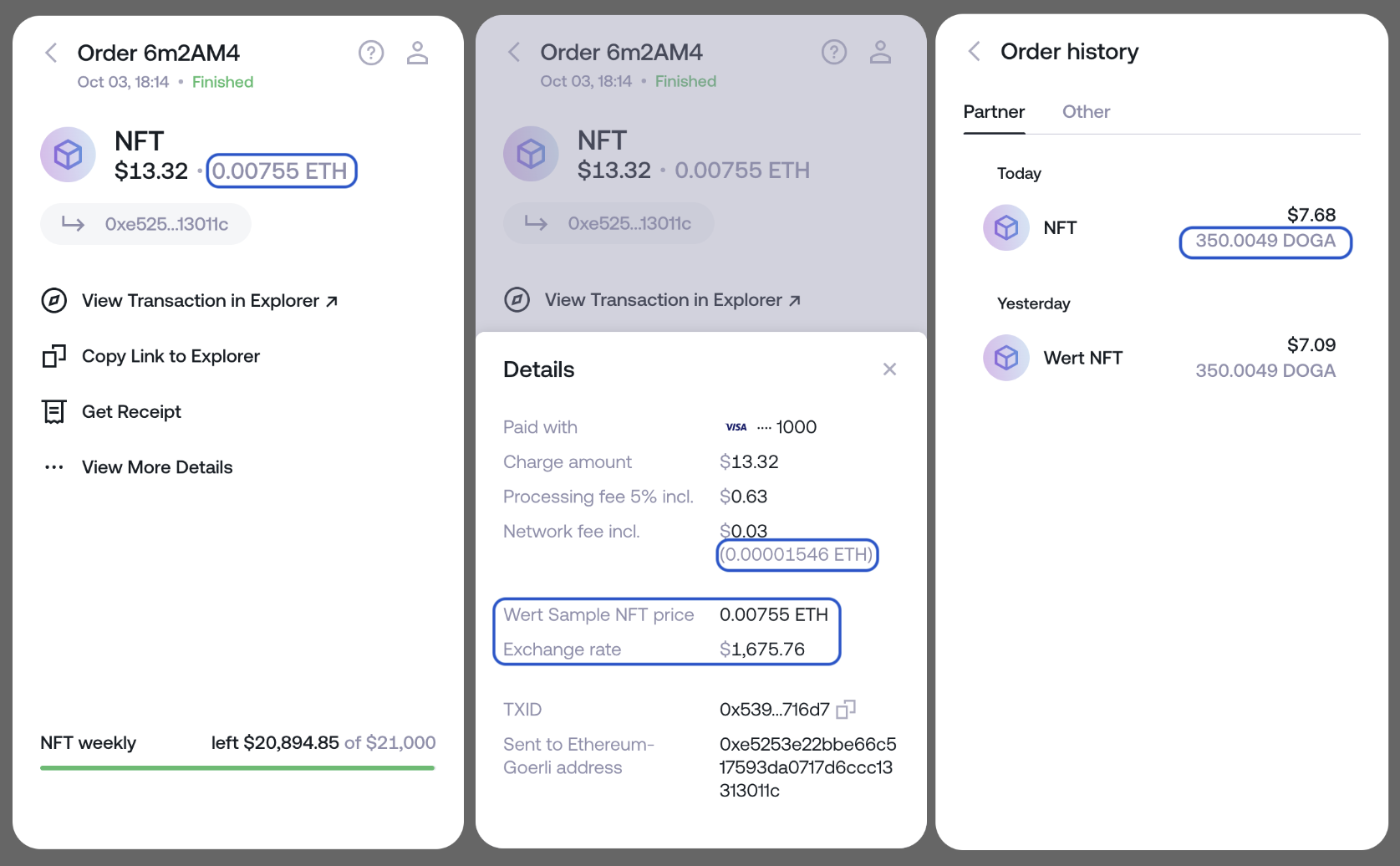
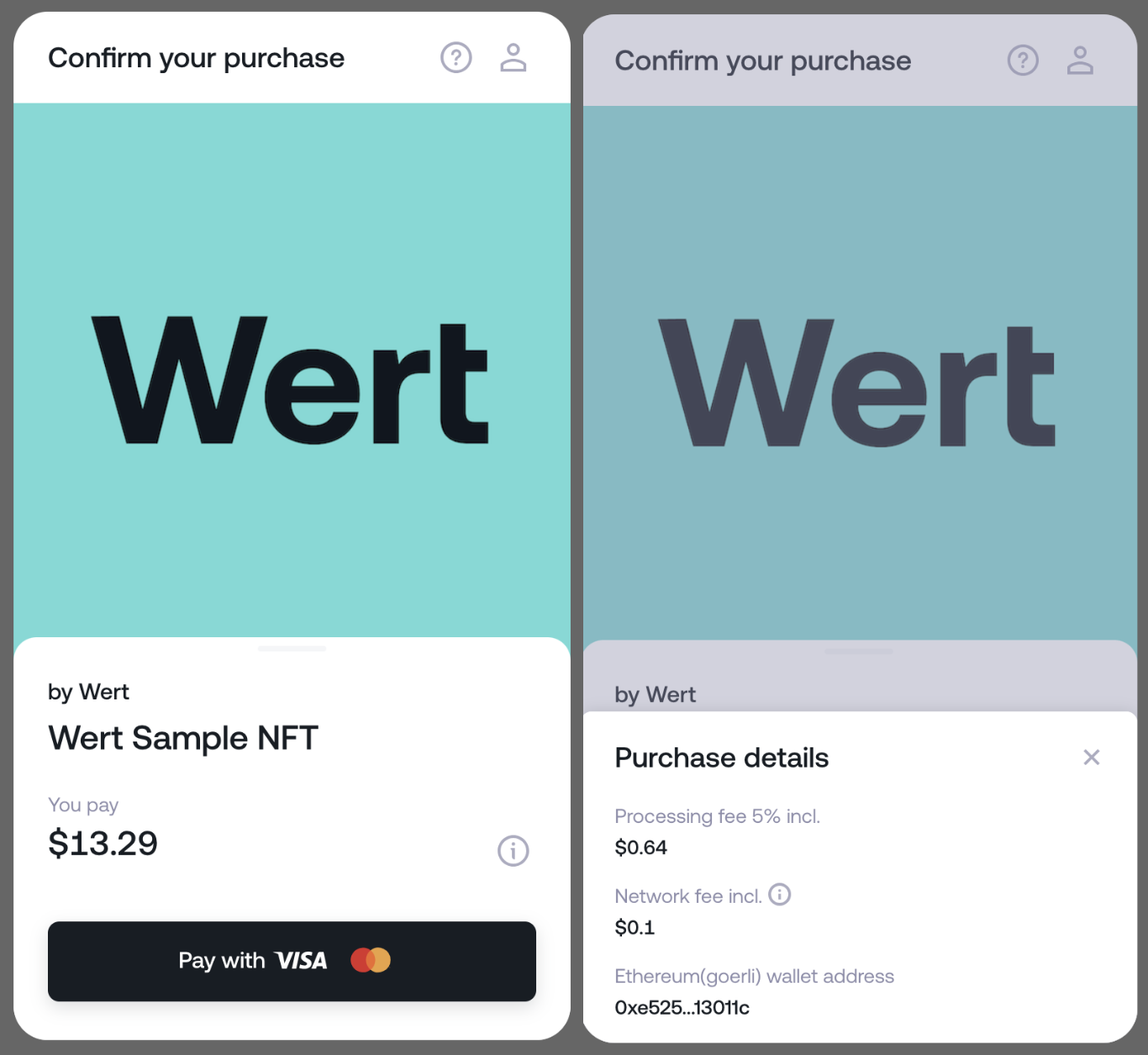
Confirm your purchase
‘Confirm your purchase’ screen
`}
{`
Order details and Order history screens
`}
However, if you prefer to display less information to your users, these UI elements can be hidden from the interface. For that: 1. Contact Wert’s Support team to turn this feature on for you. 2. Pass `is_crypto_hidden: true` upon Widget initialization as in the example below: ```javascript const widget = new WertWidget({ partner_id: 'YOUR_PARTNER_ID', is_crypto_hidden: true, ... }); ``` As a result: 1. The Widget will only load fiat amounts in the ‘**You Pay**’ and ‘**Network fee**’ sections. 2. ‘**Exchange rate**’ will not be shown. 3. Order details only contain fiat amounts and won’t display ‘**Exchange rate**’. 4. The ‘**Failed order**’ screen will only display the fiat amount. 5. Orders with `is_crypto_hidden: true` will display only fiat amounts in ‘**Order History**’. Orders without this parameter will be displayed with both amounts. 6. These UI elements will also be hidden from automatic emails that users get for successful orders and receipts that they manually request. {`
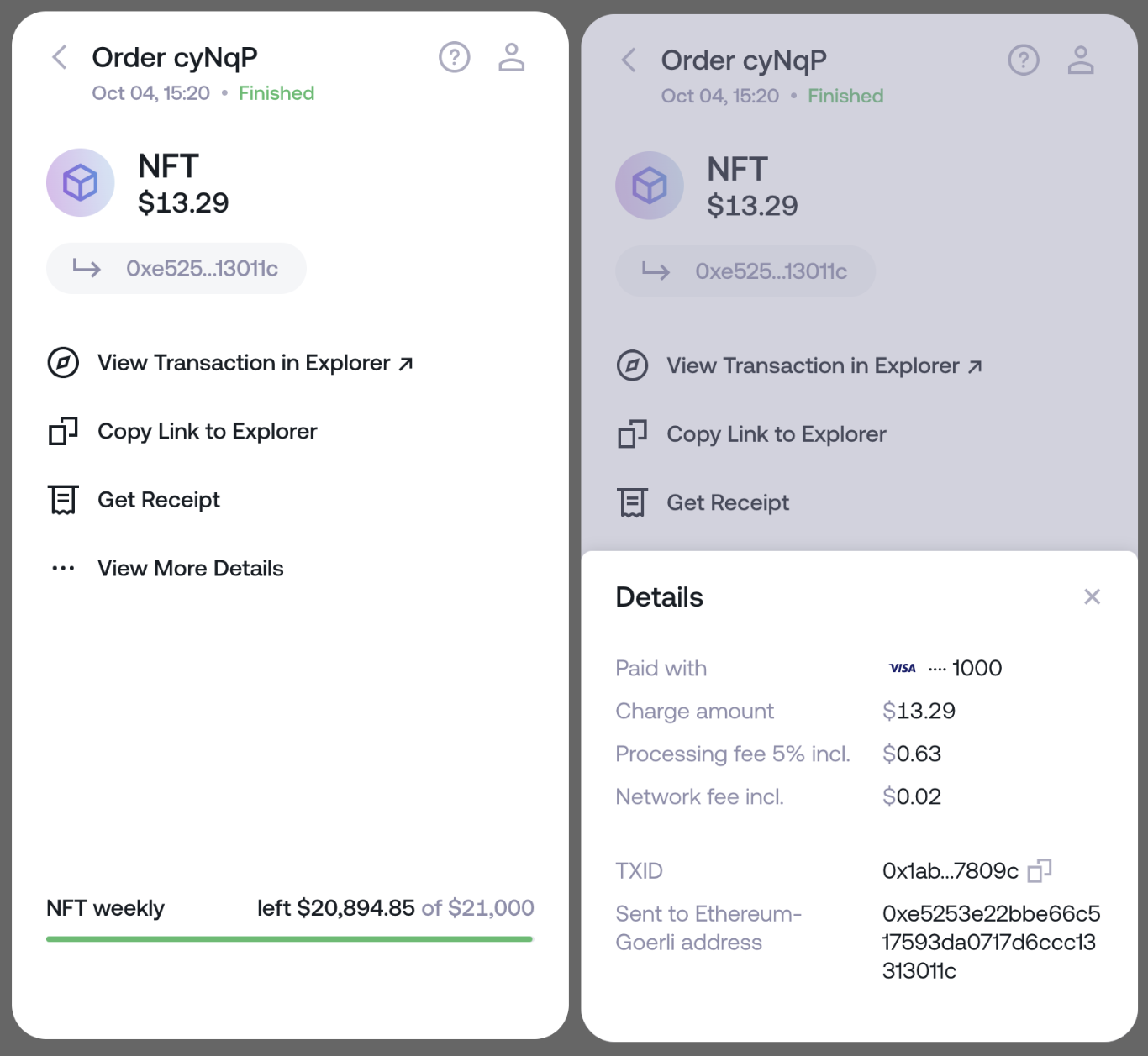
‘Confirm your purchase’ screen
Order details
`}
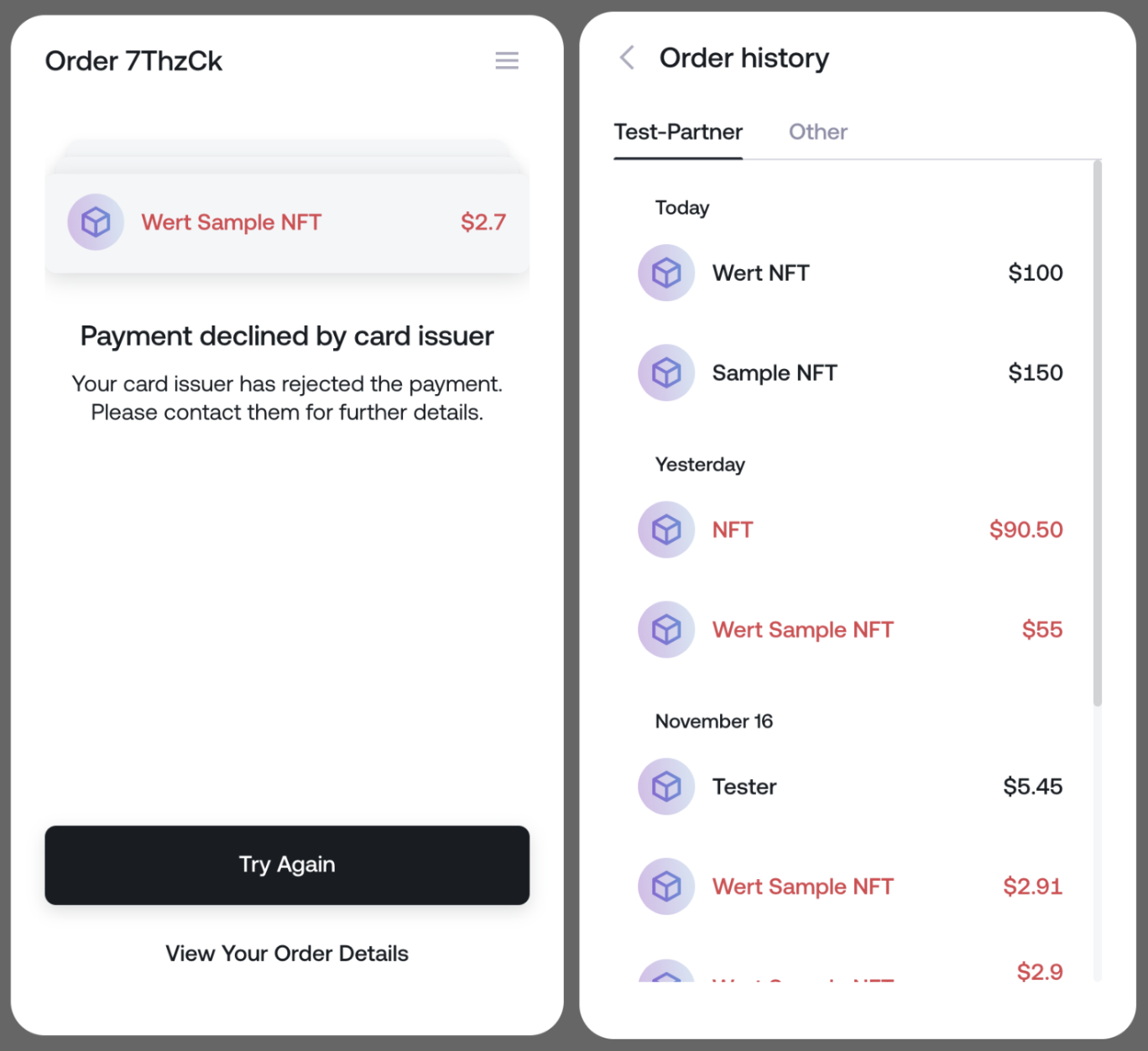
{`
Failed order and Order history screens
‘Confirm your purchase’ screen
`}
--- CONTENT END --- *** ### FILE: Documentation/widget-display-methods.md Type: MD ID: Documentation-widget-display-methods-md --- CONTENT START --- *** title: Widget display methods excerpt: '' deprecated: false hidden: false metadata: title: '' description: '' robots: index next: description: '' pages: * type: basic slug: widget-initialisation-top-up title: Fiat Onramp * type: basic slug: nft-module-widget title: NFT Checkout * type: basic slug: listerners-object title: Listeners object *** After creating and configuring the widget, you can use a few methods to control the widget's display. Please make sure you use the latest version of [SDK](https://www.npmjs.com/package/@wert-io/widget-initializer) (6.x.x). You can use the following widget class methods: | Method | Description | | :------------------- | :--------------------------------------------------------------------------------------------------------------------------------------------------- | | open | Mount the widget in the DOM and make it visible. | | close | Close the widget modal. | | updateTheme | Switch the widget's theme without reloading it. | | addEventListeners | Add event listeners. You can find more info on the event listeners in the [listeners object page](https://docs.wert.io/v1.2/docs/listerners-object). | | removeEventListeners | Remove event listeners. | The `open()` method will **initialize the widget as an iFrame**. ```javascript wertWidget.open(); ``` You can **switch the widget's theme** without reloading it; please note this method should be called only after the widget is fully loaded: ```javascript wertWidget.updateTheme({ theme: 'dark', // Use 'undefined' for the default light theme. brand_color: 'red' // Can be in any suitable format (string, HEX, rgb etc.) }); ``` You can **listen to widget events**: ```javascript wertWidget.addEventListeners({ position: data => console.log('step:', data.step), }); ``` Here are the options to **remove event listeners**: ```javascript wertWidget.removeEventListeners('rate-update'); //or wertWidget.removeEventListeners([ 'rate-update', 'payment-status' ]); //or wertWidget.removeEventListeners(); ``` --- CONTENT END --- *** ### FILE: Guides/_order.yaml Type: YAML ID: Guides-_order-yaml --- CONTENT START --- * forming-input-data * verifying-your-smart-contract * signing-a-payment-request * generating-a-keypair * passing-apple-store-review * token-support --- CONTENT END --- *** ### FILE: Guides/forming-input-data.md Type: MD ID: Guides-forming-input-data-md --- CONTENT START --- *** title: Forming input data excerpt: '' deprecated: false hidden: false metadata: title: '' description: '' robots: index next: description: '' pages: * type: basic slug: smart-contract-faq title: Smart contract FAQ * type: basic slug: nft-checkout title: NFT Checkout *** Wert facilitates the execution of payable functions as `msg.sender` using the input data provided in your widget request. Our service is analogous to a standard wallet extension, conducting transactions on behalf of users paying via card. Our NFT checkout (smart contract checkout) supports a range of functionalities, including: * Minting * Primary and secondary sales * Auctions * DeFi token swaps Using Wert requires an additional `transfer method` argument in your input data to ensure that the user receives the token within the same transaction. Depending on your contract's logic, this parameter can vary; however, commonly, this uses one of the following: ```json token_to address_recipient owner_address recipient beneficiary_ _walletaddress ``` For ERC20 token transactions, the `payable` attribute is not necessary. Further details on this process can be found in our [Smart Contract FAQ](https://docs.wert.io/docs/smart-contract-faq#can-smart-contracts-be-paid-using-erc-20s). The `sc_input_data` parameter will contain your ABI function encoded as bytecode, which should be generated using your preferred libraries or SDKs. Note that the input data examples demonstrate the function passed to us and include the approval we generated in the transaction hash. Many tools are available for these purposes, such as: * Ethereum Virtual Machine (EVM) compatible: Functions can be encoded using tools such as [Web3.js](https://web3js.readthedocs.io/en/v1.7.4/web3-eth-abi.html#encodefunctioncall) or [Viem](https://viem.sh/docs/contract/encodeFunctionData.html). The Solidity ABI specification can be referenced at [Solidity Documentation](https://docs.soliditylang.org/en/latest/abi-spec.html#). * Tezos: Convert Michelson data to JSON, then to hex using [Taquito](https://tezostaquito.io/docs/michelson_encoder/). * Concordium: Parameters are hex-encoded bytes representing binary-encoded contract method arguments. Create these using your chosen libraries or SDKs. Your input data should vary with each order, depending on project type (e.g., minting, secondary sales) and the quantity of purchased assets. Each user's address will be unique and provided when they connect their wallet to your website. This address should be included in the input data. For a comprehensive example of integration, please refer to our [Wert Widget Integration Example](https://github.com/wert-io/widget-integration-example/blob/master/src/buy-nft.ts). ## Ethereum
NFT mint ```javascript json Tamadoge NFT mint Transaction https://etherscan.io/tx/0x72d3cd16dacce83d6f7cc26fd3d7e013b396bac0c16e6eec02778f729f8e1fb1 Input data in bytecode: 0xa08720bb00000000000000000000000054cdaa42d26baaff6a47a94ce3e698b8486c8a7500000000000000000000000000000000000000000000000000000000000000000000000000000000000000000000000000000000000000000000000000000001 ABI function: { "method": "buyWithNativeWert", "types": [ "address", "uint256", "uint256" ], "inputs": [ "54Cdaa42d26BAAff6a47A94ce3E698B8486C8a75", { "type": "BigNumber", "hex": "0x00" }, { "type": "BigNumber", "hex": "0x01" } ], "names": [ "_user", "_nftLevel", "_num" ] } ```
Secondary sale on NFT marketplace ```json Secondary sale on Knownorigin NFT marketplace https://knownorigin.io/ Transaction https://etherscan.io/tx/0x18882f7bbad9518b172d9c0fd873ea9586dad0af4a551b0151629ad7d345ef8d Input data in bytecode: 0x6710c3f20000000000000000000000000000000000000000000000000000000000534c38000000000000000000000000263861e2b00e1581ee5e5fa89ca0af9b7bf606a1 ABI function: { "method": "buyEditionTokenFor", "types": [ "uint256", "address" ], "inputs": [ { "type": "BigNumber", "hex": "0x534c38" }, "263861e2b00e1581ee5e5fA89ca0Af9B7bF606a1" ], "names": [ "_id", "_recipient" ] } ```
USDC NFT mint ```json Crowdmuse USDC NFT mint Transaction https://etherscan.io/tx/0x1becda12a3c34fdf3f44811b5e8c19dc655129e07a4a0e07428db27c9e01cb22 Input data in bytecode: 0xc67a839100000000000000000000000060d02a613da7181278e9f48241fdcc0b6ec28b7fdce68bdcb0d0694283e75b5e32be7dac4e532af25842b4deadfdea6bcf270deb ABI function: { "method": "buyNFT", "types": [ "address", "bytes32" ], "inputs": [ "60D02a613da7181278e9f48241fDCc0b6EC28B7f", "0xdce68bdcb0d0694283e75b5e32be7dac4e532af25842b4deadfdea6bcf270deb" ], "names": [ "_to", "garmentType" ] } ```
Seaport purchase ```json Seaport purchase through FXHASH https://www.fxhash.xyz/ Transaction https://etherscan.io/tx/0xb68b3aba89d6deb11e8ad6d5a065dc5681294cb8b15e83d0fa6e95c0db7b60d5 Input data in bytecode: 0x76af662900000000000000000000000000000000000000000000000000000000000000c0000000000000000000000000da469a6c78d12996895721fceba62e510b38faf3000000000000000000000000c16157e00b1bff1522c6f01246b4fb621da048d0000000000000000000000000000000000000000000000000000000000000000100000000000000000000000000000000000000000000000001cdda4faccd0000000000000000000000000000000000000000000000000000000000000000064000000000000000000000000000000000000000000000000000000000000000a000000000000000000000000000000000000000000000000000000000000000010000000000000000000000000000000000000000000000000000000000000001000000000000000000000000000000000000000000000000000000000000046000000000000000000000000000000000000000000000000000000000000004e0000000000000000000000000fc1e354b579f669335dbe645046208c8687875e3000000000000000000000000aa0e012d35cf7d6ecb6c2bf861e71248501d3226000000000000000000000000000000000000000000000000000000000000016000000000000000000000000000000000000000000000000000000000000002200000000000000000000000000000000000000000000000000000000000000002000000000000000000000000000000000000000000000000000000006583279100000000000000000000000000000000000000000000000000000000667075cd000000000000000000000000000000000000000000000000000000000000000095437d0a1d4da48b000000000000000009632033e72e7d0e8951628ec78482a40000007b02230091a7ed01230072f7006a004d60a8d4e71d599b8104250f000000000000000000000000000000000000000000000000000000000000000000020000000000000000000000000000000000000000000000000000000000000001000000000000000000000000000000000000000000000000000000000000000200000000000000000000000076e27d6c7b8324fd42fe21d63da5195551dc1cc4000000000000000000000000000000000000000000000000000000000000004a0000000000000000000000000000000000000000000000000000000000000001000000000000000000000000000000000000000000000000000000000000000100000000000000000000000000000000000000000000000000000000000000020000000000000000000000000000000000000000000000000000000000000000000000000000000000000000000000000000000000000000000000000000000000000000000000000000000000000000000000000000000000000000000000000000000000000000000000000000000000000000000000000188932a1fae40000000000000000000000000000000000000000000000000000188932a1fae4000000000000000000000000000fc1e354b579f669335dbe645046208c8687875e3000000000000000000000000000000000000000000000000000000000000000000000000000000000000000000000000000000000000000000000000000000000000000000000000000000000000000000000000000000000000000000000000000000000000000000000000000000000000000000000000004547258d1ec000000000000000000000000000000000000000000000000000004547258d1ec000000000000000000000000000f11a8b885aced459275e42fa4b8f3bb09335b6b50000000000000000000000000000000000000000000000000000000000000041ed8af997f240f49e612ff04e2cc39ca21b9a9e9aee9c3a9ddf00b919f81b2a235e642d28208ddc07dd637ee679a781cdcc23cd1433cd2c6054f7d7b6ad97a5ae1b00000000000000000000000000000000000000000000000000000000000000000000000000000000000000000000000000000000000000000000000000007e0000000000000000000000000000000000000000000000000065838f1b4d9f9d076d34f8c746708d271ca46fd3fbe0106cb87cc3247e87a902ac5d8cbce881106b6be913caf9e4acbddce1b63535d199c2e8d1f1e4386413076b74570b00ede3b9b694b2843c0b0f9aa5cd520b2ed3173ca6135f02b195906d4df330404200000000000000000000000000000000000000000000000000000000000000000000 ABI Function: { "method": "acceptETHListing", "types": [ "(tuple,uint120,uint120,bytes,bytes)", "(address,address,bool,uint256)", "(address,uint256)[]" ], "inputs": [ [ [ "0xFc1e354b579f669335dbe645046208c8687875e3", "0xAA0e012d35Cf7d6EcB6c2Bf861e71248501D3226", [ [ 2, "0x76e27D6C7B8324fD42Fe21D63DA5195551dc1cc4", { "type": "BigNumber", "hex": "0x4a" }, { "type": "BigNumber", "hex": "0x01" }, { "type": "BigNumber", "hex": "0x01" } ] ], [ [ 0, "0x0000000000000000000000000000000000000000", { "type": "BigNumber", "hex": "0x00" }, { "type": "BigNumber", "hex": "0x0188932a1fae4000" }, { "type": "BigNumber", "hex": "0x0188932a1fae4000" }, "0xFc1e354b579f669335dbe645046208c8687875e3" ], [ 0, "0x0000000000000000000000000000000000000000", { "type": "BigNumber", "hex": "0x00" }, { "type": "BigNumber", "hex": "0x4547258d1ec000" }, { "type": "BigNumber", "hex": "0x4547258d1ec000" }, "0xF11a8b885aCED459275E42Fa4B8F3Bb09335B6b5" ] ], 2, { "type": "BigNumber", "hex": "0x65832791" }, { "type": "BigNumber", "hex": "0x667075cd" }, "0x0000000000000000000000000000000000000000000000000000000000000000", { "type": "BigNumber", "hex": "0x95437d0a1d4da48b000000000000000009632033e72e7d0e8951628ec78482a4" }, "0x0000007b02230091a7ed01230072f7006a004d60a8d4e71d599b8104250f0000", { "type": "BigNumber", "hex": "0x02" } ], { "type": "BigNumber", "hex": "0x01" }, { "type": "BigNumber", "hex": "0x01" }, "0xed8af997f240f49e612ff04e2cc39ca21b9a9e9aee9c3a9ddf00b919f81b2a235e642d28208ddc07dd637ee679a781cdcc23cd1433cd2c6054f7d7b6ad97a5ae1b", "0x0000000000000000000000000000000000000000000000000065838f1b4d9f9d076d34f8c746708d271ca46fd3fbe0106cb87cc3247e87a902ac5d8cbce881106b6be913caf9e4acbddce1b63535d199c2e8d1f1e4386413076b74570b00ede3b9b694b2843c0b0f9aa5cd520b2ed3173ca6135f02b195906d4df3304042" ], [ "0xDa469A6C78D12996895721fceBA62E510b38FAf3", "0xC16157e00b1bFf1522C6F01246B4Fb621dA048d0", true, { "type": "BigNumber", "hex": "0x01cdda4faccd0000" } ], [] ], "names": [ [ "order", [ "parameters", "numerator", "denominator", "signature", "extraData" ] ], [ "params", [ "fillTo", "refundTo", "revertIfIncomplete", "amount" ] ], [ "fees", [ "recipient", "amount" ] ] ] } ```
## Polygon
NFT mint ```json json Overline NFT mint https://overline.network/en Transaction https://polygonscan.com/tx/0x4ec7a561c37dca1d26208ad7b05fbb30dfad122cc71f647c78488740538a1a65 Input data in bytecode: 0x3c168eab0000000000000000000000006582da7e09056f388873950aac8deb99ed9082880000000000000000000000000000000000000000000000000000000000000001 ABI Function: { "method": "mintNFT", "types": [ "address", "uint256" ], "inputs": [ "6582da7e09056f388873950aac8DeB99eD908288", { "type": "BigNumber", "hex": "0x01" } ], "names": [ "to", "numberOfTokens" ] } ```
USDC to KNOT token swap through Quickswap ```json Karmaverse USDC to KNOT token swap through Quickswap https://karmaverse.io/ Transaction https://polygonscan.com/tx/0xf1cac6306b8bd547b7e6b9779e0ecdeeb102db3a74fa7b78b850d018e7b0f40f Input data in bytecode: 0x1927e4d800000000000000000000000000000000000000000000011c94f9415fca610000000000000000000000000000000000000000000000000000000000000625fb8f000000000000000000000000000000000000000000000000000000000000008000000000000000000000000033137dc45ddeefaf09949d5e2eea972714bf50f300000000000000000000000000000000000000000000000000000000000000020000000000000000000000002791bca1f2de4661ed88a30c99a7a9449aa84174000000000000000000000000b763f1177e9b2fb66fbe0d50372e3e2575c043e5 ABI Function: { "method": "flashPurchaseToken", "types": \[ "uint256", "uint256", "address\[]", "address" ], "inputs": \[ { "type": "BigNumber", "hex": "0x011c94f9415fca610000" }, { "type": "BigNumber", "hex": "0x0625fb8f" }, [ "2791Bca1f2de4661ED88A30C99A7a9449Aa84174", "b763F1177E9B2Fb66FBe0d50372E3e2575c043e5" ], "33137DC45DdEeFaF09949D5e2EEA972714Bf50F3" ], "names": [ "amountOut", "amountInMax", "path", "to" ] } ```
NFT bundle purchase with $MSU token swap ```json json Metasoccer NFT bundle purchase with $MSU token swap https://metasoccer.com/ Transaction https://polygonscan.com/tx/0xcaa648c827ba941225f6d60411aeb500cf2ba4f80f07ad3c1f7dc6e14a288382 Input data in bytecode: 0xea2d2f450000000000000000000000006ad7a511e911f68cd6fa4c5cb08c5fc34dc5d3740000000000000000000000000000000000000000000000000000000031e9986a0000000000000000000000006f5d7ba06ad7b28319d86fcec09fae5bbc83d32f00000000000000000000000000000000000000000000000000000000000000800000000000000000000000000000000000000000000000000000000000000011000000000000000000000000000000000000000000000000000000000000bda0000000000000000000000000000000000000000000000000000000000000d8a7000000000000000000000000000000000000000000000000000000000000defc000000000000000000000000000000000000000000000000000000000000f6bc00000000000000000000000000000000000000000000000000000000000138f40000000000000000000000000000000000000000000000000000000000013cad00000000000000000000000000000000000000000000000000000000000146d10000000000000000000000000000000000000000000000000000000000014982000000000000000000000000000000000000000000000000000000000001653a00000000000000000000000000000000000000000000000000000000000167cf00000000000000000000000000000000000000000000000000000000000195ed000000000000000000000000000000000000000000000000000000000001964300000000000000000000000000000000000000000000000000000000000197250000000000000000000000000000000000000000000000000000000000019fe4000000000000000000000000000000000000000000000000000000000001bbed000000000000000000000000000000000000000000000000000000000001bd99000000000000000000000000000000000000000000000000000000000001bde8 ABI Function: { "method": "purchaseBundle", "types": \[ "address", "uint256", "address", "uint256\[]" ], "inputs": \[ "6AD7A511e911F68cD6fA4c5Cb08C5Fc34DC5D374", { "type": "BigNumber", "hex": "0x31e9986a" }, "6f5D7bA06aD7B28319d86fceC09fae5bbC83d32F", [ { "type": "BigNumber", "hex": "0xbda0" }, { "type": "BigNumber", "hex": "0xd8a7" }, { "type": "BigNumber", "hex": "0xdefc" }, { "type": "BigNumber", "hex": "0xf6bc" }, { "type": "BigNumber", "hex": "0x0138f4" }, { "type": "BigNumber", "hex": "0x013cad" }, { "type": "BigNumber", "hex": "0x0146d1" }, { "type": "BigNumber", "hex": "0x014982" }, { "type": "BigNumber", "hex": "0x01653a" }, { "type": "BigNumber", "hex": "0x0167cf" }, { "type": "BigNumber", "hex": "0x0195ed" }, { "type": "BigNumber", "hex": "0x019643" }, { "type": "BigNumber", "hex": "0x019725" }, { "type": "BigNumber", "hex": "0x019fe4" }, { "type": "BigNumber", "hex": "0x01bbed" }, { "type": "BigNumber", "hex": "0x01bd99" }, { "type": "BigNumber", "hex": "0x01bde8" } ] ], "names": [ "_recipient", "_totalPayableTokenAmount", "_nft", "_assetIds" ] } ```
UNIswap on Polygon for Vicicoin ```json UNIswap on Polygon for Vicicoin Transaction https://polygonscan.com/tx/0xe21ff8d51f300831b61671e266a256b70dae0b5e5600252b2a766fcc3e2ae55f Input data in bytecode: 0xc04b8d59000000000000000000000000000000000000000000000000000000000000002000000000000000000000000000000000000000000000000000000000000000a000000000000000000000000064da86fdba61d3de7bc0ed6d11176a5044c466390000000000000000000000000000000000000000000000000000000064f5af71000000000000000000000000000000000000000000000017c3dfb069929e1800000000000000000000000000000000000000000000000002b799b6e279d4d78a00000000000000000000000000000000000000000000000000000000000000420d500b1d8e8ef31e21c99d1db9a6444d3adf12700001f42791bca1f2de4661ed88a30c99a7a9449aa84174000bb88a16d4bf8a0a716017e8d2262c4ac32927797a2f000000000000000000000000000000000000000000000000000000000000 ABI Function: { "method": "exactInput", "types": [ "(bytes,address,uint256,uint256,uint256)" ], "inputs": [ [ "0x0d500b1d8e8ef31e21c99d1db9a6444d3adf12700001f42791bca1f2de4661ed88a30c99a7a9449aa84174000bb88a16d4bf8a0a716017e8d2262c4ac32927797a2f", "0x64dA86fdba61d3DE7bc0ED6D11176a5044c46639", { "type": "BigNumber", "hex": "0x64f5af71" }, { "type": "BigNumber", "hex": "0x17c3dfb069929e1800" }, { "type": "BigNumber", "hex": "0x02b799b6e279d4d78a" } ] ], "names": [ [ "params", [ "path", "recipient", "deadline", "amountIn", "amountOutMinimum" ] ] ] } ```
UNIswap on Polygon for Dolz ```Text json UNIswap on Polygon for Dolz Transaction https://polygonscan.com/tx/0xeff0f818fa9f6bc8f43df0a0059165b5014f24ca820b237f0d69a21afdfd05ce Input data in bytecode: 0xb9ea2f4b00000000000000000000000000000000000000000000000000000000000001f4000000000000000000000000c2132d05d31c914a87c6611c10748aeb04b58e8f0000000000000000000000000000000000000000000000000000000000000bb80000000000000000000000006ab4e20f36ca48b61ecd66c0450fdf665fa130be000000000000000000000000000000000000000000000000000000000000012c0000000000000000000000001b7694e960cb993c235e1d4565ec6c476a6ff137 ABI Function: { "method": "swapExactInputMultihop", "types": [ "uint24", "address", "uint24", "address", "uint24", "address" ], "inputs": [ 500, "c2132D05D31c914a87C6611C10748AEb04B58e8F", 3000, "6ab4E20f36ca48B61ECd66c0450fDf665Fa130be", 300, "1b7694e960cb993C235e1D4565eC6c476a6FF137" ], "names": [ "_firstFee", "_multihopToken", "_secondFee", "_tokenToReceive", "_additionnalDeadline", "_receiver" ] } ```
## Solana
Encoding instruction data Solana programs (smart contracts) don't use ABI-style function calls like Ethereum. Instead, each instruction is a custom binary payload, and developers must serialise the input according to their program's structure As sc\_input\_data, you need to provide an instruction that includes a function call to your program (smart contract). It should be sent as a hex and contain: * The address of the program to invoke * The accounts the instruction will read from or write to * Any additional data required by the instruction (e.g. function arguments) The data field must be serialised using the same format your program expects — most often Borsh. This includes any function selectors or argument encoding. Example: ```Text json { "program_id": "11111111111111111111111111111111", "accounts": [ { "address": "BGCSawehjnxUDciqRCPfrXqzKvBeiTSe3mEtvTFC5d9q", "is_signer": true, "is_writable": true }, { "address": "C8eRw3N4ysXgbqkjw4QmtT5ws5ByE9TYGsuepVMBkXCy", "is_signer": false, "is_writable": true } ], "data": "0200000000ca9a3b00000000" } ``` Once your instruction object is formed, stringify it as JSON and then hex-encode the entire string. This is specific to Wert’s SDK, which expects sc\_input\_data in this format. This should be automated but you can manually check using this tool [https://magictool.ai/tool/category/hex/](https://magictool.ai/tool/category/hex/) When encoded, it would look like this: ```Text json 7b226163636f756e7473223a5b7b2261646472657373223a2242474353617765686a6e785544636971524350667258717a4b76426569545365336d45747654464335643971222c2269735f7369676e6572223a747275652c2269735f7772697461626c65223a747275657d2c7b2261646472657373223a224338655277334e347973586762716b6a7734516d7454357773354279453954594773756570564d426b584379222c2269735f7369676e6572223a66616c73652c2269735f7772697461626c65223a747275657d5d2c2264617461223a22303230303030303030306361396133623030303030303030222c2270726f6772616d5f6964223a223131313131313131313131313131313131313131313131313131313131313131227d ``` When using SOL commodity, your instruction must include an account that holds the funds: CYdZAb4i2oaz5CiAvwenMyUVm2DJdd2cWKsekKxxXCQX (signs the transaction) When using SPL token commodities, your instruction must include the following accounts: * The token account that holds the funds * The owner of the token account (signs the transaction) Below is a list of the token accounts used and their owners: | Token | Token Account | Owner | | :---- | :------------------------------------------- | :------------------------------------------ | | USDC | BBmpNSJGA5FUM3s8LmgE9ScPno6bELNoU1BPtJt2fsdq | e2LE43wB7WzR3B7ZxfEH1C9kTRSQYeNTU43RcuTMh1g |
## Tezos
Gen1 NFT mint ```json Playstables Gen1 NFT mint https://www.playstables.io/ Transaction https://tzkt.io/oo57FmVtc5jE5SyGbk7FSvg8YZfrdKHSRKhB72jPQCaANGSUtgs/12924024 Input data HEX: 7B0A22656E747279706F696E74223A0A226372656174655F6F726465725F666F72222C0A2276616C7565223A0A7B0A22737472696E67223A0A22747A325061647768553878616F50316D626E786A38357043487A6673576B44725035424E220A7D0A7D Michelson encoded as JSON: { "entrypoint": "create_order_for", "value": { "string": "tz2PadwhU8xaoP1mbnxj85pCHzfsWkDrP5BN" } } ```
Secondary sale ```json Secondary sale through Plenty wallet on Objkt NFT Marketplace https://plenty.network/ Transaction https://tzkt.io/ooEAReC1CvfPHPGSLNNC5XdHF3ytPFMSKLfHNUy85oX5WtUS9o1/12924386 Input data HEX: 7B0A22656E747279706F696E74223A0A2266756C66696C6C5F61736B222C0A2276616C7565223A0A7B0A227072696D223A0A2250616972222C0A2261726773223A0A5B0A7B0A22696E74223A0A2233323132373730220A7D2C0A7B0A227072696D223A0A22536F6D65222C0A2261726773223A0A5B0A7B0A22737472696E67223A0A22747A32544B664B504A31764D737A6D4832706546717950353532506F6F4C553938513278220A7D0A5D0A7D0A5D0A7D0A7D Michelson encoded as JSON: { "entrypoint": "fulfill_ask", "value": { "prim": "Pair", "args": [ { "int": "3212770" }, { "prim": "Some", "args": [ { "string": "tz2TKfKPJ1vMszmH2peFqyP552PooLU98Q2x" } ] } ] } } ```
Item purchase on Dogami NFT marketplace using $DOGA token ```json Item purchase on Dogami NFT marketplace using $DOGA token https://dogami.com/ Transaction https://tzkt.io/opZQk2oRBrMXVj3yXSBYXd5ngSHyNUf5pK7Nhe6qo4yakQ6G3xh/61665636 Input data HEX: 7b0d0a22656e747279706f696e74223a0d0a22617070726f7665222c0d0a2276616c7565223a0d0a7b0d0a227072696d223a0d0a2250616972222c0d0a2261726773223a0d0a5b0d0a7b0d0a22737472696e67223a0d0a224b5431486e5636574a464c6b734c614c5a524c636b31545834536262635458554c583974220d0a7d2c0d0a7b0d0a22696e74223a0d0a2230220d0a7d0d0a5d0d0a7d0d0a7d Michelson encoded as JSON: { "entrypoint": "approve", "value": { "prim": "Pair", "args": [ { "string": "KT1HnV6WJFLksLaLZRLck1TX4SbbcTXULX9t" }, { "int": "0" } ] } } ```
## Concordium
Concordium entrypoint
As **sc\_input\_data** you should send data that will be added to the transaction to your contract and that will be used to call on your contract. It should be sent as a hex and contain an entrypoint, method, and parameters to be called on a contract. Example: ``` 7b22656e747279706f696e74223a227472616465722e627579222c22706172616d73223a22307836313035303030303030303030303030227d ``` Which, when decoded, would look like this: ``` {"entrypoint":"trader.buy","params":"0x6105000000000000"} ``` The entry point is the contract name, and the method is divided by a dot. This format is the only available way to call the contract method based on their protocol.
--- CONTENT END --- *** ### FILE: Guides/generating-a-keypair.md Type: MD ID: Guides-generating-a-keypair-md --- CONTENT START --- *** title: Keypair creation excerpt: '' deprecated: false hidden: false metadata: title: '' description: '' robots: index next: description: '' pages: * type: basic slug: nft-module-widget title: NFT Checkout * type: basic slug: going-live title: Going live! * type: basic slug: generate-signed-data title: Generate signed data *** To keep your private key safe, **you should construct the signature on your backend** and pass it to the frontend when initializing the widget. Please note: This is NOT a wallet private key, it is just a digital signature to encrypt the request. **For the sandbox** environment, Wert will provide you with the private key; if you don't have it, please get in touch with us via [email or Discord](). As part of the process of **going live**, you must generate a keypair and provide Wert with the public key. This is required to authenticate requests and ensure you initiated them. Whenever Wert mentions your private key, this generated key is what we are speaking of. ## Quick generation Click on "Generate Keypair" to instantly generate a secure keypair for your environment. ## Generate locally If you prefer to generate keys within your own secure environment, you can use the code snippets below. --- CONTENT END --- *** ### FILE: Guides/passing-apple-store-review.md Type: MD ID: Guides-passing-apple-store-review-md --- CONTENT START --- *** title: Passing Apple Store Review excerpt: '' deprecated: false hidden: false metadata: title: '' description: '' robots: index next: description: '' pages: * type: basic slug: general-faq title: General FAQ *** Wert's product can be seamlessly integrated into iOS applications via WebView; however, due to Apple Store policies, initial builds featuring the Wert on-ramp may occasionally be flagged during review. Apple exercises oversight over how cryptocurrency applications are marketing their services, essentially acting as a regulator. This is to prevent unlicensed cryptocurrency applications from being published on the App Store, imposing similar regulations to Visa/Mastercard. In addressing Apple's concerns, it is important to explain that: 1. Your wallet or web3 application does not act as an exchange or a Virtual Asset Service Provider (VASP), nor does it facilitate the transmission of cryptocurrency. It's important to emphasize this distinction. There can be a lack of understanding by Apple reviewers regarding the difference between custodial and non-custodial wallets; this needs to be clarified to them. 2. Wert is not a conventional cryptocurrency exchange for trading digital assets. Instead, it operates as a licensed cryptocurrency purchasing service in Europe ([link to FIU](https://mtr.ttja.ee/taotluse_tulemus/537747)) and the USA ([link to MSB](https://wert.io/docs/msb-registration.pdf)). 3. Wert is the entity enabling the purchase of cryptocurrency, which happens in accordance with Wert's [Terms & Conditions](https://widget.wert.io/terms-and-conditions). The purchase occurs on a separate page hosted by Wert. The app developer's role is simply to provide a link to this page within a native browser. All purchases adhere to applicable laws and regulations. 4. Wert has an agreement with the app developer (you can attach the signed affiliate agreement with Wert), which clearly demarcates the responsibilities of Wert and the app developer and states that the app developer does not participate in providing the cryptocurrency service. Please do not hesitate to reach out if you require assistance crafting your response. Many of our partner wallet providers have already navigated the review process successfully. --- CONTENT END --- *** ### FILE: Guides/signing-a-payment-request.md Type: MD ID: Guides-signing-a-payment-request-md --- CONTENT START --- *** title: Signing a payment request excerpt: '' deprecated: false hidden: false metadata: title: '' description: '' robots: index next: description: '' pages: * type: basic slug: generate-signed-data title: Generate signed data * type: basic slug: nft-checkout title: NFT Checkout * type: basic slug: verifying-your-smart-contract title: Verifying your smart contract * type: basic slug: generating-a-keypair title: Keypair creation *** **We recommend using our helper** to construct the required signatures as described in [Generate signed data](https://docs.wert.io/docs/generate-signed-data). However, if that is not possible, you can follow this guide to do it manually. The data you will need to construct your signature is as follows:
Property Type Description Example
address String The user’s address that receives the token/NFT. It will also act as a fallback address if a smart contract can’t be executed. In case of fallback, we will transfer `commodity_amount` to this address. 0x00000000000000000000000000000 00000000001
commodity String Cryptocurrency which should be sent to the smart contract, see [Supported coins and blockchains](https://docs.wert.io/docs/supported-coins-and-blockchains) `commodity:'ETH'`
network String Network for the cryptocurrency, see [Supported coins and blockchains](https://docs.wert.io/docs/supported-coins-and-blockchains) `network: 'ethereum'`
commodity_amount Number Amount of cryptocurrency necessary for executing the given smart contract. The precision is 8 decimal places; please round up, or you will get a 9004 signature error code. 0.03 (maximum 8 decimal places)
sc_address String The address of the smart contract. 0x00000000000000000000000000000 00000000002
sc_input_data String Input data used for the smart contract execution in hex format. For Tezos, this must be Michelson code passed as JSON transformed into hex format. See [Forming input data](https://docs.wert.io/docs/forming-input-data). 0x40c10f1900000000000000000000000 085f584812fc19c69e4dd586f06df93aa7 bdadd4d000000000000000000000000 000000000000000000000000016345 785d8a
## Alternate implementation Use the following implementation if you are importing scripts via CDNs and Buffer is not available for use. --- CONTENT END --- *** ### FILE: Guides/token-support.md Type: MD ID: Guides-token-support-md --- CONTENT START --- *** title: Token Support excerpt: '' deprecated: false hidden: false metadata: title: '' description: '' robots: index next: description: '' --------------- ![](https://files.readme.io/cdf20d7-image.png) **Have Your Own Token?** Elevate your user experience with Wert's onramp integration. Add your custom token directly and offer a seamless checkout experience right from your website or app. Increase conversion and boost retention with instant, in-platform purchases. **Looking to Sell NFTs?** Leverage Wert's NFT checkout to handle transactions using your own token. Execute smart contracts effortlessly to ensure your NFT sales are smooth and secure. ## Requirements: * An ERC-20 token (EVM chains) or FA 1.2 Asset (for tokens on Tezos blockchain) * Your token must be listed on any of our partner exchanges: Hitbtc - [https://hitbtc.com/market-overview/overview](https://hitbtc.com/market-overview/overview) Gate.io - [https://www.gate.io/price](https://www.gate.io/price) Kucoin - [https://www.kucoin.com/markets](https://www.kucoin.com/markets) Bitmart - [https://www.bitmart.com/markets/en-US](https://www.bitmart.com/markets/en-US) * Your token's daily trading volume should be above $100k, traded against USD/USDT/USDC * Your token should not be a security or restricted anywhere in the world. We might ask you to get a legal opinion from a reputable law firm in your target jurisdiction that it is not a security. * Can you provide us with a liquidity loan? We ask for at least $25-50K initial liquidity. We start selling from this reserve and then balance our wallets on the abovementioned exchanges. Whenever a user buys from us, we trade the equivalent amount so the volume imprint is the same as if your users went to the exchange themselves. Not listed on our partner exchanges? Don't worry. We offer full support for custom exchange integrations. Just get in touch with our sales team, and we'll guide you through the process. ### Some example transactions: **Simple purchase:** [https://etherscan.io/tx/0x22f6adb52a55cb43a4c1a335fdec64a154305f3ba929279d360b3237866ea536](https://etherscan.io/tx/0x22f6adb52a55cb43a4c1a335fdec64a154305f3ba929279d360b3237866ea536) **NFT checkout:** [https://etherscan.io/tx/0x18c526313ece852cf73372bc667f5fe8b3bcf37e1b7fe02179973060c40012e9](https://etherscan.io/tx/0x18c526313ece852cf73372bc667f5fe8b3bcf37e1b7fe02179973060c40012e9) ## Ready to Get Started? Here's How: 1. Connect: Reach out to our friendly team to kick off your journey. 2. Formalities: Sign the Partner and Liquidity Agreements to solidify our collaboration. 3. Liquidity: Send the initial liquidity to get us started. 4. Integration: We'll add your token to our platform within 1 to 2 weeks. 5. Launch: Start selling and watch your project grow! --- CONTENT END --- *** ### FILE: Guides/verifying-your-smart-contract.md Type: MD ID: Guides-verifying-your-smart-contract-md --- CONTENT START --- *** title: Verifying your smart contract excerpt: '' deprecated: false hidden: false metadata: title: '' description: '' robots: index next: description: '' pages: * type: basic slug: supported-coins-and-blockchains title: Supported coins and blockchains * type: basic slug: smart-contract-faq title: Smart contract FAQ * type: basic slug: nft-checkout title: NFT Checkout *** **EVM-compatible smart contracts** have to be verified on a block explorer. If your contract cannot be verified, you will need to add it to your Partner Dashboard. You can do so by following these steps: 1. Login to your Partner Dashboard and locate the `Settings -> Smart Contracts` option. 2. Click the `Add New Smart Contract` button to open the interaction. 3. Add your smart contract address to the `SC address` field and the ABI of the implementation contract to the `Contract ABI` field. If you are using a **proxy contract**, save the proxy address in the `SC address` field against the ABI of the implementation contract. 4. Click `Add` and the list in the Partner Dashboard will update to show your added contract. After verifying your smart contract, you can interact with Wert as required. If you make any changes, you must add the new contract and ABI. **EVM-compatible smart contracts** run on blockchains that support the Ethereum Virtual Machine, these include: * Ethereum * Polygon * Arbitrum * Binance * Base * Shibarium * Theta **For contracts on other blockchains, verification isn't needed.** --- CONTENT END --- *** ### FILE: Introduction/_order.yaml Type: YAML ID: Introduction-_order-yaml --- CONTENT START --- * introduction * integration-steps * supported-coins-and-blockchains * service-availability --- CONTENT END --- *** ### FILE: Introduction/integration-steps.md Type: MD ID: Introduction-integration-steps-md --- CONTENT START --- *** title: Integration steps excerpt: '' deprecated: false hidden: false metadata: title: '' description: '' robots: index next: description: '' pages: * type: basic slug: general-faq title: General FAQ * type: basic slug: smart-contract-faq title: Smart contract FAQ * type: basic slug: fiat-onramp title: Fiat Onramp * type: basic slug: nft-checkout title: NFT Checkout *** # 1. Get your sandbox credentials The first things you will need to start integrating Wert are your sandbox partner ID and login details. If you don't already have these, please book a meeting with [Sales](https://calendly.com/d/cjw-pwv-3mh/wert-team-call) or email [partner@wert.io](mailto:partner@wert.io). If you are integrating our NFT checkout you will also be provided with your sandbox private key which will be used to [sign payment requests](https://docs.wert.io/docs/generate-signed-data). # 2. Initialize the widget Depending on the module you will be using, you can refer to the [Fiat Onramp page](https://docs.wert.io/docs/fiat-onramp) or the [NFT Checkout page](https://docs.wert.io/docs/nft-checkout). These pages provide details on how to initialize the widget for your module, including all the parameters and methods you will need to get started. You can find **examples** of the integrations on [Github](https://github.com/wert-io/widget-integration-example). # 3. Set up the webhooks To receive notifications about your users and their Wert orders, you will need to set up webhooks. You can check all the details of how our webhooks work on the [Webhooks page](https://docs.wert.io/docs/webhooks). # 4. Test the integration in the sandbox After completing your integration, make sure that your code is functioning as intended and test the purchase flow in the sandbox environment. You can find information about it on our [Sandbox page](https://docs.wert.io/docs/sandbox). # 5. Go live! We've prepared a short guide about [going live](https://docs.wert.io/docs/going-live) which has all the steps you'll need to complete so that you're ready for that big day! Just let our team know when that will be so that we can work with you to get everything done. --- CONTENT END --- *** ### FILE: Introduction/introduction.md Type: MD ID: Introduction-introduction-md --- CONTENT START --- *** title: Introduction excerpt: '' deprecated: false hidden: false metadata: title: '' description: '' robots: index next: description: '' pages: * type: basic slug: top-up-module title: Integration steps * type: basic slug: general-faq title: General FAQ * type: basic slug: smart-contract-faq title: Smart contract FAQ *** Welcome to the Wert documentation. This documentation will help you get started with integrating Wert. If you have any questions, please do not hesitate to book a meeting with [Sales](https://calendly.com/d/cjw-pwv-3mh/wert-team-call) or email [partner@wert.io](mailto:partner@wert.io). Please note that our partner support team is only available during standard business hours Central European time. You can also schedule an onboarding/demo **call with our team** via [calendly](https://calendly.com/d/cjw-pwv-3mh/wert-team-call). # Our solutions We offer our partners two solutions depending on their needs; our [Fiat onramp](https://docs.wert.io/docs/fiat-onramp) solution is perfect for **simple crypto purchases with a card** while our [NFT checkout](https://docs.wert.io/docs/nft-checkout) allows your users to pay for **NFTs** or make purchases through a **smart contract**. Both solutions are designed to seamlessly integrate with your product so your users can have a unified experience. Before starting the integration, **we recommend checking out our [General FAQ](https://docs.wert.io/docs/general-faq) and [Smart Contract FAQ](https://docs.wert.io/docs/smart-contract-faq).** # Partner sandbox module tuner To simplify the wallet top-up integration, we have developed the module tuner. In the module tuner, you can set up widget language, available currencies and create custom themes to match your website branding. You can find the module tuner on your Partner Dashboard in both [sandbox](https://partner-sandbox.wert.io/login) and [production](https://partner.wert.io/login). --- CONTENT END --- *** ### FILE: Introduction/service-availability.md Type: MD ID: Introduction-service-availability-md --- CONTENT START --- *** title: Service availability excerpt: '' deprecated: false hidden: false metadata: title: '' description: '' robots: index next: description: '' --------------- ## Supported countries | Country | Fiat Onramp | NFT Checkout | | -------------------------------------------- | ----------- | ------------ | | Afghanistan | ✗ | ✗ | | Åland Islands | ✓ | ✓ | | Albania | ✗ | ✓ | | Algeria | ✗ | ✓ | | American Samoa | ✓ | ✓ | | Andorra | ✓ | ✓ | | Angola | ✓ | ✓ | | Anguilla | ✓ | ✓ | | Antigua and Barbuda | ✓ | ✓ | | Argentina | ✓ | ✓ | | Armenia | ✗ | ✓ | | Aruba | ✓ | ✓ | | Australia | ✓ | ✓ | | Austria | ✓ | ✓ | | Azerbaijan | ✗ | ✓ | | Bahamas | ✗ | ✓ | | Bahrain | ✓ | ✓ | | Bangladesh | ✓ | ✓ | | Barbados | ✗ | ✓ | | Belarus | ✗ | ✗ | | Belgium | ✓ | ✓ | | Belize | ✓ | ✓ | | Benin | ✓ | ✓ | | Bermuda | ✓ | ✓ | | Bhutan | ✓ | ✓ | | Bolivia | ✗ | ✓ | | Bonaire, Sint Eustatius and Saba | ✓ | ✓ | | Bosnia and Herzegovina | ✗ | ✓ | | Botswana | ✗ | ✓ | | Bouvet Island | ✗ | ✗ | | Brazil | ✓ | ✓ | | British Indian Ocean Territory | ✓ | ✓ | | British Virgin Islands | ✓ | ✓ | | Brunei Darussalam | ✓ | ✓ | | Bulgaria | ✓ | ✓ | | Burkina Faso | ✗ | ✓ | | Burundi | ✓ | ✓ | | Cambodia | ✗ | ✓ | | Cameroon | ✓ | ✓ | | Canada | ✓ | ✓ | | Cape Verde (Cabo Verde) | ✓ | ✓ | | Cayman Islands | ✗ | ✗ | | Central African Republic | ✗ | ✓ | | Chad | ✓ | ✓ | | Chile | ✓ | ✓ | | China | ✗ | ✓ | | Christmas Island | ✓ | ✓ | | Cocos (Keeling) Islands | ✓ | ✓ | | Colombia | ✓ | ✓ | | Comoros | ✓ | ✓ | | Cook Islands | ✓ | ✓ | | Costa Rica | ✓ | ✓ | | Cote D'Ivoire | ✓ | ✓ | | Croatia | ✓ | ✓ | | Cuba | ✗ | ✗ | | Curaçao | ✓ | ✓ | | Cyprus | ✓ | ✓ | | Czech Republic | ✓ | ✓ | | Democratic Republic of the Congo | ✗ | ✗ | | Denmark | ✓ | ✓ | | Djibouti | ✓ | ✓ | | Dominica | ✓ | ✓ | | Dominican Republic | ✓ | ✓ | | Ecuador | ✗ | ✓ | | Egypt | ✗ | ✗ | | El Salvador | ✓ | ✓ | | Equatorial Guinea | ✓ | ✓ | | Eritrea | ✓ | ✓ | | Estonia | ✓ | ✓ | | Eswatini (Swaziland) | ✓ | ✓ | | Ethiopia | ✗ | ✓ | | Falkland Islands (Malvinas) | ✓ | ✓ | | Faroe Islands | ✓ | ✓ | | Fiji | ✓ | ✓ | | Finland | ✓ | ✓ | | France | ✓ | ✓ | | French Guiana | ✓ | ✓ | | French Polynesia | ✓ | ✓ | | French Southern Territories | ✗ | ✗ | | Gabon | ✓ | ✓ | | Gambia | ✓ | ✓ | | Georgia | ✓ | ✓ | | Germany | ✓ | ✓ | | Ghana | ✗ | ✓ | | Gibraltar | ✗ | ✗ | | Greece | ✓ | ✓ | | Greenland | ✓ | ✓ | | Grenada | ✓ | ✓ | | Guadeloupe | ✓ | ✓ | | Guam | ✓ | ✓ | | Guatemala | ✓ | ✓ | | Guernsey | ✓ | ✓ | | Guinea | ✓ | ✓ | | Guinea-Bissau | ✗ | ✓ | | Guyana | ✗ | ✓ | | Haiti | ✗ | ✓ | | Heard Island and McDonald Islands | ✗ | ✗ | | Honduras | ✓ | ✓ | | Hong Kong | ✓ | ✓ | | Hungary | ✓ | ✓ | | Iceland | ✗ | ✓ | | India | ✓ | ✓ | | Indonesia | ✓ | ✓ | | Iran | ✗ | ✗ | | Iraq | ✗ | ✗ | | Ireland | ✓ | ✓ | | Isle of Man | ✓ | ✓ | | Israel | ✓ | ✓ | | Italy | ✓ | ✓ | | Jamaica | ✗ | ✓ | | Japan | ✓ | ✓ | | Jersey | ✓ | ✓ | | Jordan | ✓ | ✓ | | Kazakhstan | ✓ | ✓ | | Kenya | ✓ | ✓ | | Kiribati | ✓ | ✓ | | Kosovo | ✓ | ✓ | | Kuwait | ✓ | ✓ | | Kyrgyzstan | ✓ | ✓ | | Laos | ✗ | ✓ | | Latvia | ✓ | ✓ | | Lebanon | ✗ | ✓ | | Lesotho | ✓ | ✓ | | Liberia | ✓ | ✓ | | Libya | ✗ | ✓ | | Liechtenstein | ✓ | ✓ | | Lithuania | ✓ | ✓ | | Luxembourg | ✓ | ✓ | | Macau | ✓ | ✓ | | Macedonia | ✓ | ✓ | | Madagascar | ✓ | ✓ | | Malawi | ✓ | ✓ | | Malaysia | ✓ | ✓ | | Maldives | ✓ | ✓ | | Mali | ✗ | ✓ | | Malta | ✓ | ✓ | | Marshall Islands | ✓ | ✓ | | Martinique | ✓ | ✓ | | Mauritania | ✓ | ✓ | | Mauritius | ✗ | ✓ | | Mayotte | ✓ | ✓ | | Mexico | ✓ | ✓ | | Micronesia | ✓ | ✓ | | Moldova | ✓ | ✓ | | Monaco | ✓ | ✓ | | Mongolia | ✗ | ✓ | | Montenegro | ✓ | ✓ | | Montserrat | ✓ | ✓ | | Morocco | ✓ | ✓ | | Mozambique | ✓ | ✓ | | Myanmar (Burma) | ✗ | ✓ | | Namibia | ✓ | ✓ | | Nauru | ✓ | ✓ | | Nepal | ✗ | ✗ | | Netherlands | ✓ | ✓ | | New Caledonia | ✓ | ✓ | | New Zealand | ✓ | ✓ | | Nicaragua | ✗ | ✓ | | Niger | ✓ | ✓ | | Nigeria | ✗ | ✓ | | Niue | ✓ | ✓ | | Norfolk Island | ✓ | ✓ | | Northern Mariana Islands | ✓ | ✓ | | North Korea | ✗ | ✗ | | Norway | ✓ | ✓ | | Oman | ✓ | ✓ | | Pakistan | ✗ | ✓ | | Palau | ✓ | ✓ | | Palestine | ✓ | ✓ | | Panama | ✗ | ✓ | | Papua New Guinea | ✓ | ✓ | | Paraguay | ✓ | ✓ | | Peru | ✓ | ✓ | | Philippines | ✓ | ✓ | | Pitcairn | ✓ | ✓ | | Poland | ✓ | ✓ | | Portugal | ✓ | ✓ | | Puerto Rico | ✓ | ✓ | | Qatar | ✗ | ✓ | | Republic of the Congo | ✓ | ✓ | | Réunion | ✓ | ✓ | | Romania | ✓ | ✓ | | Russia | ✗ | ✗ | | Rwanda | ✓ | ✓ | | Saint Barthélemy | ✓ | ✓ | | Saint Helena, Ascension and Tristan da Cunha | ✓ | ✓ | | Saint Kitts and Nevis | ✓ | ✓ | | Saint Lucia | ✓ | ✓ | | Saint Martin (French part) | ✓ | ✓ | | Saint Pierre and Miquelon | ✓ | ✓ | | Saint Vincent and the Grenadines | ✓ | ✓ | | Samoa | ✓ | ✓ | | San Marino | ✓ | ✓ | | São Tomé and Príncipe | ✓ | ✓ | | Saudi Arabia | ✓ | ✓ | | Senegal | ✗ | ✓ | | Serbia | ✓ | ✓ | | Seychelles | ✓ | ✓ | | Sierra Leone | ✓ | ✓ | | Singapore | ✓ | ✓ | | Sint Maarten | ✓ | ✓ | | Slovakia | ✓ | ✓ | | Slovenia | ✓ | ✓ | | Solomon Islands | ✓ | ✓ | | Somalia | ✗ | ✓ | | South Africa | ✓ | ✓ | | South Georgia and the South Sandwich Islands | ✗ | ✗ | | South Korea | ✓ | ✓ | | South Sudan | ✗ | ✗ | | Spain | ✓ | ✓ | | Sri Lanka | ✓ | ✓ | | Sudan | ✗ | ✗ | | Suriname | ✓ | ✓ | | Svalbard and Jan Mayen | ✓ | ✓ | | Sweden | ✓ | ✓ | | Switzerland | ✓ | ✓ | | Syria | ✗ | ✗ | | Taiwan | ✓ | ✓ | | Tajikistan | ✓ | ✓ | | Tanzania | ✓ | ✓ | | Thailand | ✓ | ✓ | | Timor-Leste | ✓ | ✓ | | Togo | ✓ | ✓ | | Tokelau | ✓ | ✓ | | Tonga | ✓ | ✓ | | Trinidad and Tobago | ✗ | ✓ | | Tunisia | ✗ | ✗ | | Turkey | ✗ | ✗ | | Turkmenistan | ✓ | ✓ | | Turks and Caicos Islands | ✓ | ✓ | | Tuvalu | ✓ | ✓ | | Uganda | ✗ | ✓ | | Ukraine | ✗ | ✓ | | United Arab Emirates | ✓ | ✓ | | United Kingdom | ✓ | ✓ | | United States | ✓ | ✓ | | United States Virgin Islands | ✓ | ✓ | | Uruguay | ✓ | ✓ | | U.S. Minor Outlying Islands | ✗ | ✗ | | Uzbekistan | ✓ | ✓ | | Vanuatu | ✗ | ✓ | | Vatican City (Holy See) | ✓ | ✓ | | Venezuela | ✗ | ✗ | | Vietnam | ✓ | ✓ | | Wallis and Futuna | ✓ | ✓ | | Western Sahara | ✗ | ✓ | | Yemen | ✗ | ✓ | | Zambia | ✓ | ✓ | | Zimbabwe | ✗ | ✓ | ## Supported US States | State | Fiat Onramp | NFT Checkout | | ------------------- | ----------- | ------------ | | Alabama | ✗ | ✓ | | Alaska | ✗ | ✓ | | Arizona | ✓ | ✓ | | Arkansas | ✓ | ✓ | | California | ✓ | ✓ | | Colorado | ✓ | ✓ | | Connecticut | ✓ | ✓ | | Delaware | ✓ | ✓ | | Florida | ✓ | ✓ | | Georgia | ✓ | ✓ | | Hawaii | ✗ | ✓ | | Idaho | ✓ | ✓ | | Illinois | ✓ | ✓ | | Indiana | ✓ | ✓ | | Iowa | ✓ | ✓ | | Kansas | ✓ | ✓ | | Kentucky | ✓ | ✓ | | Louisiana | ✓ | ✓ | | Maine | ✓ | ✓ | | Maryland | ✓ | ✓ | | Massachusetts | ✓ | ✓ | | Michigan | ✓ | ✓ | | Minnesota | ✓ | ✓ | | Mississippi | ✓ | ✓ | | Missouri | ✓ | ✓ | | Montana | ✓ | ✓ | | Nebraska | ✓ | ✓ | | Nevada | ✗ | ✓ | | New Hampshire | ✓ | ✓ | | New Jersey | ✓ | ✓ | | New Mexico | ✗ | ✓ | | New York | ✗ | ✓ | | North Carolina | ✓ | ✓ | | North Dakota | ✓ | ✓ | | Ohio | ✓ | ✓ | | Oklahoma | ✓ | ✓ | | Oregon | ✗ | ✓ | | Pennsylvania | ✓ | ✓ | | Puerto Rico | ✗ | ✓ | | Rhode Island | ✓ | ✓ | | South Carolina | ✓ | ✓ | | South Dakota | ✓ | ✓ | | Tennessee | ✓ | ✓ | | Texas | ✓ | ✓ | | U.S. Virgin Islands | ✗ | ✓ | | Utah | ✓ | ✓ | | Vermont | ✗ | ✓ | | Virginia | ✓ | ✓ | | Washington | ✗ | ✓ | | Washington DC | ✗ | ✓ | | West Virginia | ✗ | ✓ | | Wisconsin | ✓ | ✓ | | Wyoming | ✓ | ✓ | --- CONTENT END --- *** ### FILE: Introduction/supported-coins-and-blockchains.md Type: MD ID: Introduction-supported-coins-and-blockchains-md --- CONTENT START --- *** title: Supported coins and blockchains excerpt: '' deprecated: false hidden: false metadata: title: '' description: '' robots: index next: description: '' pages: * type: basic slug: fiat-onramp title: Fiat Onramp * type: basic slug: nft-checkout title: NFT Checkout * type: basic slug: verifying-your-smart-contract title: Verifying your smart contract *** # Production
Cryptocurrency Available networks ‘commodity’ option 'network' option Supported for smart contracts Decimal Precision
Aavegotchi Polygon 'GHST' 'polygon' Yes 18
ANML Polygon 'ANML' 'polygon' Yes 18
Arbitrum Arbitrum 'ARB' 'arbitrum' Yes 18
AVAX Avalanche 'AVAX' 'avalanche' Yes 18
Badger Badger 'BUX' 'mainnet' No 18
Binance Coin Binance 'BNB' 'bsc' Yes 18
Bitcoin Bitcoin 'BTC' 'bitcoin' No 8
Bone ShibaSwap Shibarium 'BONE' 'shibarium' Yes 18
Concordium Concordium 'CCD' 'concordium' Yes 5
Dogami Tezos 'DOGA' 'tezos' Yes 5
Ethereum Ethereum Arbitrum Base Hemi 'ETH' 'ethereum' 'arbitrum' 'base' 'hemi' Yes 18
EUROe Concordium 'EUROE' 'mainnet' No 6
GPRO Polygon 'GPRO' 'polygon' Yes 18
Hemi Hemi 'HEMI' 'hemi' Yes 18
LayerAI Ethereum Binance 'LAI' 'ethereum' 'bsc' No 18
LimeWire Ethereum 'LMWR' 'ethereum' Yes 18
Lugh Tezos 'EURL' 'tezos' No 6
MANA Polygon Ethereum 'MANA' 'polygon' 'ethereum' Yes 18
NEAR Near 'NEAR' 'near' Yes 8
Oasys Oasys 'OAS' 'oasys' Yes 8
opBNB opBNB 'OPBNB' 'opbnb' Yes 18
POL Polygon 'POL' 'polygon' Yes 18
Rootstock BTC Rootstock 'RBTC' 'rootstock' Yes 18
Stacks Stacks 'STX' 'stacks' No 6
Solana Solana 'SOL' 'solana' Yes 9
Tamadoge Polygon 'TAMA' 'polygon' No 18
Tezos Tezos 'XTZ' 'tezos' Yes 6
TFUEL Theta 'TFUEL' 'theta' Yes 18
TON The Open Network 'TON' 'ton' Yes 8
USDC Arbitrum Base Ethereum Avalanche Shibarium Solana Polygon Hemi 'USDC' 'arbitrum' 'base' 'ethereum' 'avalanche' 'shibarium' 'solana' 'polygon' 'hemi' Yes 6
USDT Polygon Ethereum Binance TON Hemi 'USDT' 'polygon' 'ethereum' 'bsc' 'ton' 'hemi' Yes 6 6 18 6 6
USD Tez Tezos 'USDTZ' 'tezos' Yes 6
Vyvo Vyvo 'VSC' 'vyvo' Yes 5
Wrapped Ether Polygon 'WETH' 'polygon' Yes 18
Wrapped Matic Polygon 'WMATIC' 'polygon' Yes 18
XCAD opBNB Binance 'XCAD' 'opbnb' 'bsc' Yes 18
# Sandbox
Cryptocurrency Available networks ‘commodity’ option 'network' option Decimal Precision
Binance BSC 'BNB' 'bsc' 18
BONE Puppynet 'BONE' 'puppynet' 18
Badger Badger 'BUX' 'badger' 18
Concordium Concordium 'CCD' 'concordium' 18
Ethereum Sepolia Base Arbitrum 'ETH' 'sepolia' 'base_sepolia' 'arbitrum_sepolia' 18
EUROe Concordium 'EUROe' 'concordium' 18
Hemi Hemi 'HEMI' 'hemi' 18
POL Amoy 'POL' 'amoy' 18
Solana Solana 'SOL' 'solana' 9
Test Token Amoy BSC KuCoin Base Arbitrum Sepolia opBNB Puppynet Hemi 'TT' 'amoy' 'bsc' 'kucoin' 'base_sepolia' 'arbitrum_sepolia' 'sepolia' 'opbnb' 'puppynet' 'hemi' 18
Test Token Solana 'TT' 'solana' 9
Tezos Ghostnet 'XTZ' 'ghostnet' 6
opBNB opBNB 'opBNB' 'opbnb' 18
## Test Token contracts Test Token is the only ERC-20 token available in sandbox. It’s a standard ERC-20 token, which can be used to test the interaction of ERC-20 tokens against your smart contract. If you need to acquire some Test Tokens for your own testing, you can simulate a purchase on sandbox to transfer some to you. You will not be charged for this purchase and we ask that you send the tokens back once you have finished testing. Test Token contracts are deployed at the following addresses: Arbitrum Sepolia network - `0x103EF343661335B85BE98EfEfF7f726Be7CeeeDE` Ethereum Sepolia network - `0x42D8BCf255125BB186459AF66bB74EEF8b8cC391` Polygon Amoy network - `0x834bBE71a0a5C91A4Aff10Df400A963D95AD4775` Binance Smart Chain - `0x4C07B79C3D8954A51Efc342EdA5D08f8b1f9ceC4 ` Base Sepolia network - `0x3bE123Ff0ec7c0717D6C05C8957EA7880e2FfDcb` Puppynet - `0x4C07B79C3D8954A51Efc342EdA5D08f8b1f9ceC4` Solana - `Hza3mZYRv7ZZw2xo1kvWvD4YXLnhA47JtTZBhgr8LTU7` Hemi - `0x33e8Bf90e1aafcE42490e05880810f6d09699e02` --- CONTENT END --- *** ### FILE: Reference/_order.yaml Type: YAML ID: Reference-_order-yaml --- CONTENT START --- * webhooks * converter * data-api * error-codes --- CONTENT END --- *** ### FILE: Reference/converter.md Type: MD ID: Reference-converter-md --- CONTENT START --- *** title: Converter excerpt: '' deprecated: false hidden: false metadata: title: '' description: '' robots: index next: description: '' pages: * type: endpoint slug: getting-started-with-data-api title: Data API *** ## Endpoint specification The converter endpoint allows you to receive information on a transaction without going through the execution flow. You can use the response to display the exact amount before opening the widget. Additionally, the amount from response can be passed into the widget. | Environment | URL | Method | | :----------- | :------------------------------------------------ | :----- | | `Sandbox` | `https://sandbox.wert.io/api/v3/partners/convert` | `POST` | | `Production` | `https://widget.wert.io/api/v3/partners/convert` | `POST` | **Headers:** ``` 'X-Partner-ID: YOUR_PARTNER_ID' //string, required 'Content-Type: application/json' ``` ## Rate limit To ensure API stability and fair usage, we implement a rate limit on all conversion requests. If you exceed these limits, the API will return a 429 Too Many Requests error. ### Limits and Constraints * **Threshold**: 1 request per 250 ms per IP address. * **Throughput**: Approximately 4 requests per second. * **Lockout Period**: Any request sent within 250 ms of the previous request from the same IP will return `429 - Too Many Requests` error. **Recommendation**: To prevent users from hitting these limits, we recommend implementing the conversion logic or a request-throttler directly in your frontend. ## Parameters The following properties are used when making a request: Only `USD` is available in sandbox. | Property | Required | Type | Description | | :------------ | :-------------------------- | :-------- | :------------------------------------------------------------------------------------------------------------- | | from | yes | string | Base asset ( Fiat or Crypto). Refer to [Supported coins and blockchains](https://docs.wert.io/docs/supported-coins-and-blockchains) | | network | yes | string | Base asset network. Refer to [Supported coins and blockchains](https://docs.wert.io/docs/supported-coins-and-blockchains) | | to | yes | string | Quote asset ( Fiat or Crypto). Refer to [Supported coins and blockchains](https://docs.wert.io/docs/supported-coins-and-blockchains) | | amount | yes | numerical | Base asset amount | | partner_data | required for smart contract | object | Partner data object | | sc_address | required for smart contract | string | The address of your smart contract | | sc_input_data | required for smart contract | string | Input data that will be used for the smart contract execution in hex format | | signature | required for smart contract | string | A digital signature used to encrypt the request to ensure you have sent it | ## Sample request for a crypto transaction ```curl curl -X POST \ --url 'https://sandbox.wert.io/api/v3/partners/convert' \ -H 'Content-Type: application/json' \ -H 'X-Partner-ID: your-partner-id' \ -d '{ "from": "ETH", "network": "sepolia", "to": "USD", "amount": 0.05 }' ``` ## Sample request for a smart contract transaction ```curl curl -X POST \ --url 'https://sandbox.wert.io/api/v3/partners/convert' \ -H 'Content-Type: application/json' \ -H 'X-Partner-ID: your-partner-id' \ -d '{ "from": "ETH", "network": "sepolia", "to": "USD", "amount": 0.05, "partner_data": { "sc_address": "0xC545CEae428785a5AE77bfF262600deC7F7d76d2", "sc_input_data": "0x9dae76ea000000000000000000000000000000000000000000000000000000000000001400000000000000000000000000000000000000000000000000000000000000010000000000000000000000000000000000000000000000000000000000000000", "signature": "d035046e8eda9b2c9c4413bfd31ed42b7df056108c83110aa8ae70f9ca167e1a2047d1b906afa66a770939dd074d1eff27b029ec2c27b39dc30a076e31221209" } }' ``` ## Response The endpoint will return the following information:
Parameter Description
ticker The rate at which cryptocurrency is being sold.
fee_percent % fee taken by the service.
currency_amount The final amount in fiat that the user will pay.
fee_amount Amount paid in fiat to cover the service fee.
commodity_amount The amount of cryptocurrency that the user will receive.
purchase_amount The amount of fiat that will be used to purchase cryptocurrency ( `purchase_amount` = `currency_amount` - `fee_amount` - `currency_miner_fee`)
miner_fee The amount of crypto that will be used to cover blockchain fees.
currency_miner_fee Price of miner fee in fiat (`currency_miner_fee` = `miner_fee` • `ticker`).
## Sample responses ```json 200 (OK) { "status": "ok", "body": { "ticker": 2672.540034535, "fee_percent": 0.05, "currency_amount": 144.3, "fee_amount": 6.87, "commodity_amount": 0.05, "purchase_amount": 137.43, "miner_fee": 0.00142144, "currency_miner_fee": 3.8 } } ``` ```json 400 (Bad Request) { "status": "error", "error_description": "amount: must be no less than 0.", "request_id": "string" } { "status": "error", "error_description": "amount is too low", "request_id": "string" } { "status": "error", "error_description": "from: cannot be blank; to: cannot be blank.", "request_id": "string" } { "code": 1302, "status": "error", "error_description": "unknown commodity", "request_id": "424f8c727a9b2664f2de61c16b5cf169" } { "code": 1301, "status": "error", "error_description": "commodity is disabled", "request_id": "83c4bbaa60198284846fd77e0bb72293" } { "code": 1013, "status": "error", "error_description": "unknown currency", "request_id": "701f7153101206e1e2ef871aa539f40b" } { "code": 9001, "status": "error", "error_description": "the partner doesn't exist", "request_id": "76fec9b0ba9fda16c68a4ca2d038186d" } ``` --- CONTENT END --- *** ### FILE: Reference/data-api.md Type: MD ID: Reference-data-api-md --- CONTENT START --- *** title: Data API deprecated: false hidden: false link: new_tab: false metadata: title: '' description: '' robots: index next: pages: * slug: converter title: Converter type: basic * slug: webhooks title: Webhooks type: basic *** # Endpoint specification Data API allows partners to retrieve information about your users and any orders associated with your Partner ID. It also includes support for direct user creation if enabled for your Partner ID. **Endpoint URLs:**
Endpoint URL Method
Orders [https://partner-sandbox.wert.io/api/external/orders](https://partner-sandbox.wert.io/api/external/orders) GET
Users [https://partner-sandbox.wert.io/api/external/users](https://partner-sandbox.wert.io/api/external/users) GET
User Create [https://partner-sandbox.wert.io/api/external/users/create](https://partner-sandbox.wert.io/api/external/users/create) POST
Card Register [https://cards-reg-iframe-sandbox.wert.io/api/v1/partner/register](https://cards-reg-iframe-sandbox.wert.io/api/v1/partner/register) POST
Endpoint URL Method
Orders [https://partner.wert.io/api/external/orders](https://partner.wert.io/api/external/orders) GET
Users [https://partner.wert.io/api/external/users](https://partner.wert.io/api/external/users) GET
User Create [https://partner.wert.io/api/external/users/create](https://partner.wert.io/api/external/users/create) POST
Card Register [https://cards.wert.io/api/v1/partner/register](https://cards.wert.io/api/v1/partner/register) POST

# Authentication To authenticate your requests, include your API key in the HTTP header of every request.
Header Key Value
X-Api-Key `your-unique-api-key`

Your API Key carries many privileges, so be sure to keep it secure!

Your API key is provided exclusively by Wert during onboarding. Store this safely in your backend. Never share your key; if you suspect a compromise, contact us immediately to issue a new one.

Note: Sandbox and Production keys are unique to their respective environments and are not interchangeable.
# API Reference ## Get orders Get detailed orders data associated with your partner account. ### **Endpoint**: `GET /api/external/orders` 👉 Refer to endpoints table for a full link. ### Parameters Configure your request using the parameters below to search and filter order results.
Parameter Description Possible Values
limit The number of orders you want to retrieve.

Defaults to `10`.
0 to 20
cursor\_id Fetches the next page of results using the `next_cursor_id` from a previous response.

Defaults to empty string.
`01KAQWBNWWGG06HR5T9Z35A3WD`
search\_by Allows setting order or click IDs to find specific order(s). comma separated order\_ids or click\_ids
order\_by Allows setting the order as ascending or descending.

Defaults to desc.
`asc` / `desc`
start\_date Filters orders with created\_at after this timestamp. `YYYY-MM-DDTHH:MM:SSZ` (eg. 2025-11-19T23:59:59.00Z)
end\_date Filters orders with created\_at up to this timestamp. `YYYY-MM-DDTHH:MM:SSZ`

Date Filtering Reference:

  • start\_date - end\_date — returns orders for the specified period.
  • Use a narrow time range if you have a high volume of orders. Max 20 orders per request.

### Example Requests ```bash # 1. Get the 10 most recent orders (Default) curl -X GET 'https://partner-sandbox.wert.io/api/external/orders' \ -H 'X-API-KEY: your-unique-api-key' # 2. Retrieve 20 orders using a specific cursor and ascending order curl -X GET -G 'https://partner-sandbox.wert.io/api/external/orders' \ -H 'X-API-KEY: your-unique-api-key' \ -d 'limit=20' \ -d 'cursor_id=01KAQWBNWWGG06HR5T9Z35A3WD' \ -d 'order_by=asc' # 3. Search for orders using a single click_id curl -X GET -G 'https://partner-sandbox.wert.io/api/external/orders' \ -H 'X-API-KEY: your-unique-api-key' \ -d 'search_by=click_id' # 4. Search using multiple click_ids and order_ids (comma-separated) curl -X GET -G 'https://partner-sandbox.wert.io/api/external/orders' \ -H 'X-API-KEY: your-unique-api-key' \ -d 'search_by=click_id1,click_id2,order_id1,order_id2' # 5. Filter orders by a specific status (e.g., failed) curl -X GET -G 'https://partner-sandbox.wert.io/api/external/orders' \ -H 'X-API-KEY: your-unique-api-key' \ -d 'status=failed' # 6. Filter by date range (Narrow range recommended for high volume) curl -X GET -G 'https://partner-sandbox.wert.io/api/external/orders' \ -H 'X-API-KEY: your-unique-api-key' \ -d 'start_date=2025-11-19T00:00:00Z' \ -d 'end_date=2025-11-19T23:59:59Z' # 7. Filter orders by a specific status and commodity curl -X GET -G 'https://partner-sandbox.wert.io/api/external/orders' \ -H 'X-API-KEY: your-unique-api-key' \ -d 'status=failed' \ -d 'commodity=tt_amoy.erc-20.polygon' ```
### Orders Response Upon a successful request, the response includes the following fields:
Variable Description
success Indicates if the request was successfully processed.
data An array containing the retrieved order objects. See [order object](https://docs.wert.io/docs/data-api#order-object).
next\_cursor\_id The cursor string used to fetch the next page of results.
total The total count of orders matching the search criteria.

### Order Object The following fields represent the schema for each order in the data array. Parameters marked as filterable can be used to customize your queries by using `filter name`, as demonstrated in the request examples.
Variable Description Filterable Filter Name
order\_id The unique identifier for the order in Wert's database. Yes search\_by
click\_id The identifier you pass to Wert when you initialise the widget. Yes search\_by
currency The base currency for the order. No -
currency\_amount The value of the order in the base currency. No -
crypto The crypto asset purchased or sent to the smart contract. Yes commodity
crypto\_amount The amount of the crypto asset purchased or sent to the smart contract. No -
user\_id The unique identifier for the user in Wert's database. Yes user\_ids
status The status of the order. See [statuses](https://docs.wert.io/docs/data-api#order-status). Yes status
card\_id The unique identifier for the card used in Wert's database. Yes card\_id
created\_at Timestamp of when the order was created (UTC). No -
changed\_at Timestamp of when the order was last updated (UTC). No -
partner\_fee The USD amount of fees collected as partner revenue. No -
partner\_fee\_percent The percentage of fees collected as partner revenue. No -
wert\_fee The USD amount of fees collected as Wert revenue. No -
wert\_fee\_percent The percentage of fees collected as Wert revenue. No -
tx\_id Blockchain transaction hash. Yes tx\_id
processed\_through The acquirer who processed the card payment. No -
card\_brand Visa or Mastercard. No -
fail\_reason Payment error code. Refer to [error code](https://docs.wert.io/docs/data-api#payment-error-codes) descriptions. Yes fail\_reason
payment\_type Authentication method of the payment (e.g., "3ds\_v2"). Yes `payment_type`
additional\_data Additional information. No -
address The address specified for the order. No -
sc\_input\_data Smart contract input data sent in the transaction. No -

### Example Response ```json JSON { "success": true, "data": [ { "order_id": "01HNWX0HSK85WW9W5A3RZS1BBH", "click_id": "82960ad6-e52c-48b1-9293-5658709da384", "currency": "usd", "currency_amount": 1.07, "crypto": "matic.simple.polygon", "crypto_amount": 1.28928444, "user_id": "01HNWWXZ8FQ9FSH08A8ACHH7K1", "status": "success", "card_id": "01HNWWZ6E1T0BJT46H35M42JT7", "created_at": "2024-02-05 15:08:29", "changed_at": "2024-02-05 15:08:32", "tx_id": "0xbef4262a7c56f64423b80e4342ee4309595dcdb78d8c201fd752dc1d9c29c19e", "processed_through": "safecharge", "card_brand": "VISA", "fail_reason": "", "payment_type": "non_3ds", "additional_data": null, "address": "0xAA453aD5c9CF7F04bFe0DfdD12b27504AFdb800b", }, { "order_id": "01HMXQ6AN3XKQAZHPRSM13ED3X", "click_id": "click_id", "currency": "usd", "currency_amount": 5, "crypto": "tt_goerli.erc-20.ethereum", "crypto_amount": 4.36051815, "user_id": "01HMVWY6V7B9ZHA6P2C48AP5C7", "status": "failed", "card_id": "01HMVX1NJB6QDW5YKXA13HB2CG", "created_at": "2024-01-24 12:30:20", "changed_at": "2024-01-24 12:30:27", "tx_id": "", "card_brand": "VISA", "fail_reason": "4007", "payment_type": "unknown", "additional_data": null, "address": "0xAA453aD5c9CF7F04bFe0DfdD12b27504AFdb800b", } ], "next_cursor_id": "01KAQWBNWWGG06HR5T9Z35A3WD", "total": 2 } ```
### Order Status The following order statuses are available: | Status | Description | | :-------- | :------------------------------------------------------------------------ | | success | The order was successful and has been sent on the blockchain | | failed | The order has failed and will not be sent on the blockchain | | cancelled | The payment for the order was processed but the order was later cancelled | | pending | The order is being processed but it hasn't been sent on the blockchain | | progress | The order is being processed but payment has not yet been completed | | created | The order has been created but payment has not yet been processed |
### Payment Error Codes The following table identifies the specific cause of transaction failures returned in the `fail_reason` field in [order object](https://docs.wert.io/docs/data-api#order-object). Use these codes to provide accurate troubleshooting steps to your users.
Error Code Description
4000 We weren’t able to charge the user’s card and the order was not completed. The user can try again.
4001 The transaction failed due to an incorrect CVV/CVC. The user can try again ensuring they enter the correct CVV/CVC.
4002
4010
4012
Payment was declined by the card issuer. The user should contact them for further details.
4003 Incorrect card details. The user can try again ensuring they enter valid card details.
4004 Insufficient balance. The user should add funds to their card and try again.
4005 Card limit was exceeded. The user should use a different card to complete their purchase.
4011 Card validation failed. The user can add a valid card and try again.
4013 Payment was declined due to risk assessment.
4014 Name on the bank payment account doesn't match the verified identity. The user should contact support for further assistance.
4015 Payment wasn't received within the expected time.
4016 Payment was received after the order timeout period. Funds will be refunded shortly.
4017 Payment amount doesn't match the order amount.
4018 Payment was canceled by the user. No funds were charged.
## Get users Fetch detailed users data you have created or served. ### **Endpoint**: `GET /api/external/users` 👉 Refer to endpoints table for a full link. ### Parameters Configure your request using the parameters below to search and filter user results.
Parameter Description Possible Values
limit The number of users you want to retrieve. 0 to 20
offset Skips specified number of users.

Defaults to 0.
`10`
order\_by Allows setting the user as ascending or descending.

Defaults to desc.
`asc` / `desc`
from Filters users with created\_at after this timestamp. `YYYY-MM-DDTHH:MM:SSZ` (eg. 2025-11-19T23:59:59.00Z)
to Filters users with created\_at up to this timestamp.

Date Filtering Reference:

  • from - to — returns users for the specified period.
  • Use a narrow time range if you have a high number of users. Max 20 users per request.

### Example request ```bash ### 1. Get the most recent users (Default) curl -X GET 'https://partner-sandbox.wert.io/api/external/users' \ -H 'X-Api-Key: your-unique-api-key' ### 2. Retrieve 20 users from a specific offset curl -X GET -G 'https://partner-sandbox.wert.io/api/external/users' \ -H 'X-Api-Key: your-unique-api-key' \ -d 'limit=20' \ -d 'offset=20' ### 3. Search for a specific user by ID curl -X GET -G 'https://partner-sandbox.wert.io/api/external/users' \ -H 'X-Api-Key: your-unique-api-key' \ -d 'user_ids=user_id' ### 4. Search for multiple users (comma-separated IDs) curl -X GET -G 'https://partner-sandbox.wert.io/api/external/users' \ -H 'X-Api-Key: your-unique-api-key' \ -d 'user_ids=user_id1,user_id2,user_id3' ### 5. Filter users by KYC status (e.g., success) curl -X GET -G 'https://partner-sandbox.wert.io/api/external/users' \ -H 'X-Api-Key: your-unique-api-key' \ -d 'lkyc_status=success' ### 6. Filter by date range (When users were created) curl -X GET -G 'https://partner-sandbox.wert.io/api/external/users' \ -H 'X-Api-Key: your-unique-api-key' \ -H 'Content-Type: application/json' \ -d 'from=2025-11-20T00:00:00.00Z' \ -d 'to=2025-11-20T23:59:59.00Z' ### 7. Filter users by phone country curl -X GET -G 'https://partner-sandbox.wert.io/api/external/users' \ -H 'X-Api-Key: your-unique-api-key' \ -d 'phone_country=RU' ### 8. Filter users by kyc country curl -X GET -G 'https://partner-sandbox.wert.io/api/external/users' \ -H 'X-Api-Key: your-unique-api-key' \ -d 'kyc_country=RUS' ```
### Users Response Upon a successful request, the response includes the following fields:
Variable Description
success Indicates if the request was successfully processed.
data An array containing the retrieved user objects. See [user object](https://docs.wert.io/docs/data-api#user-object).
total The total count of users matching the search criteria.

### User Object The following fields represent the schema for each order in the data array. Parameters marked as filterable can be used to customize your queries by using `filter name`, as demonstrated in the request examples.
Variable Description Filterable Filter Name
user\_id User's Wert ID Yes user\_ids
country User's KYC country. alpha3 Yes kyc\_country
phone\_country Users phone country. alpha2 Yes phone\_country
lkyc\_status Users non-document verification status Yes lkyc\_status
fkyc\_status Users document verification status Yes fkyc\_status
banned Is the user banned by Wert No -
created\_at Date and time of the user's creation (UTC) Yes to / from
limits.crypto\_remaining The user's current crypto limit left in USD. Zero if no KYC or active KYC is not success No -
limits.crypto\_spending How much in USD has the user already spent from the current crypto limits No -
limits.digital\_goods\_remaining >The user's current NFT limit left in USD. Zero if no KYC or active KYC is not success No -
limits.digital\_goods\_spending How much in USD has the user already spent from the current NFT limits No -
linked\_payment\_methods An array of objects representing the user's saved payment options. See [linked payment methods object](https://docs.wert.io/docs/data-api#linked-payment-methods). No -

### Linked Payment Methods
Variable Description
linked\_payment\_methods.cards\[].brand Payment method brand
linked\_payment\_methods.cards\[].card\_id Payment method card ID associated with Wert
linked\_payment\_methods.cards\[].created\_at Payment method creation date
linked\_payment\_methods.cards\[].last\_digits Payment method last digits
linked\_payment\_methods.method Payment method

### Example Response ```json JSON { "data": [ { "country": "DEU", "created_at": "2025-11-19T11:21:48.200421Z", "fkyc_status": "retry", "limits": { "crypto_remaining": "0", "crypto_spending": "0", "digital_goods_remaining": "0", "digital_goods_spending": "0" }, "linked_payment_methods": [ { "cards": [ { "brand": "VISA", "card_id": "01KADXN9TN3QEMG9DHWX6G7Y0S", "created_at": "2025-11-19T11:23:09.526895Z", "last_digits": "1000" } ], "method": "bank_card" } ], "lkyc_status": "failed", "phone": "+49*****356", "phone_country": "DE", "user_id": "01KADXJS47C9B1WG8V3ZNM2SV7" }, { "country": "DEU", "created_at": "2025-11-19T11:19:44.098153Z", "fkyc_status": "not initiated", "limits": { "crypto_remaining": "6000", "crypto_spending": "0", "digital_goods_remaining": "6000", "digital_goods_spending": "0" }, "linked_payment_methods": [], "lkyc_status": "success", "phone": "+49*****355", "phone_country": "DE", "user_id": "01KADXEZZQF8DQEPP4AE28SKBX" }, { "country": "DEU", "created_at": "2025-11-19T11:14:42.380854Z", "fkyc_status": "not initiated", "limits": { "crypto_remaining": "6000", "crypto_spending": "0", "digital_goods_remaining": "6000", "digital_goods_spending": "0" }, "linked_payment_methods": [], "lkyc_status": "success", "phone": "+49*****354", "phone_country": "DE", "user_id": "01KADX5RRHCHDMPFWEEFX2YDS6" } ], "success": true, "total": 3 } ```
## Create User Create users via API. Contact our support team to request this feature for your Partner ID. ### **Endpoint:** `POST /api/external/users/create` 👉 Refer to endpoints table for a full link. Non-English characters should be standardized to English before passing to API. ### Parameters Configure your request using the parameters below to create user via API. | Property | Required | Validation | | :------------------------------------ | :------- | :-------------------------------------------------------------------------------------------------------------- | | **has\_accepted\_terms\_of\_service** | ✅ | possible values: `true`, `false` | | **phone** | ✅ | +1234567890 | | **email** | ✅ | [john.doe@example.com](mailto:john.doe@example.com) | | **first\_name** | ✅ | 2–30 characters; A-Z, a-z, 0-9; No special characters (?, @, #, $, etc.); Cannot be all numeric | | **middle\_name** | Optional | 2–30 characters; A-Z, a-z, 0-9; No special characters (?, @, #, $, etc.); Cannot be all numeric | | **last\_name** | ✅ | 2–30 characters; A-Z, a-z, 0-9; No special characters (?, @, #, $, etc.); Cannot be all numeric | | **date\_of\_birth** | ✅ | format: `YYYY-MM-DD` | | **country\_of\_residence** | ✅ | alpha3 country code; | | **state\_of\_residence** | ✅ | alpha2 US state code; |
### Example request Example of user data to create a user with Wert and initiate an automatic LKYC. ```shell shell curl -X POST 'https://partner.wert.io/api/external/users/create' \ -H 'X-Api-Key: your-unique-api-key' \ -H 'Content-Type: application/json' \ -d '{ "has_accepted_terms_of_service": true, "phone": "+1234567890", "email": "john.doe@example.com", "first_name": "John", "middle_name": "Paul", "last_name": "Doe", "date_of_birth": "1990-01-01", "country_of_residence": "USA", "state_of_residence": "CA" }' ```
Possible response from User Creation endpoint. Refer to [user creation error codes](https://docs.wert.io/docs/data-api#user-creation-error-codes) for more details. 200 (OK)}> ```json { "sessionId": "string", "requestId": "string", } ``` 400 (Bad Request)}> ```json { "field": "phone", "message": "Invalid phone format" } ``` ```json { "field": "email", "message": "Invalid email format" } ``` ```json { "field": "date_of_birth", "message": "Invalid date_of_birth format" } ``` ```json { "field": "first_name", "message": "Invalid first_name format" } ``` ```json { "field": "country_of_residence", "message": "Invalid country_of_residence format" } ``` 401 (Unauthorized)}> ```json { "message": "ERR_UNAUTHORIZED" } ``` 403 (Forbidden)}> ```json { "field": "has_accepted_terms_of_service", "message": "user must accept the terms of service" } ``` ```json { "field": "country_of_residence", "message": "restricted country" } ``` ```json { "field": "partner_id", "message": "user creation is not allowed" } ``` 409 (Conflict)}> ```json { "message": "A user with this phone already exists", "user_id": "{user_id}", "created_at": "{creation date and time}" } ```
### User Creation Error Codes
Error code Description
400 Bad request. Ensure all required fields are present and meet validation criteria.
401 Unauthorized. Check your API key or contact support.
403 Forbidden. Ensure the user is 18+ years old, country and state are supported, and user has accepted terms and conditions.
409 Conflict. A user with the same phone number may already exist.
429 Too Many Requests. Retry later.
500 Internal Server Error
## Card Register Allows you to register users cards directly from your backend. This requires PCI DSS certification, please get in touch with Wert team to request this feature for your Partner ID. Only works for users who have been created by the user creation API above. ### **Endpoint:** `POST /api/v1/partner/register` 👉 Refer to endpoints table for a full link. ### Parameters Configure your request using the parameters below to register a card for an existing user. | Property | Required | Validation | | :-------------------------------- | :---------- | :------------------------------------------------------------------------------------------------------------------------------------------------------------- | | **card\_number** | ✅ | String, 12–19 | | **exp\_month** | ✅ | 2 digits, only numbers | | **exp\_year** | ✅ | 4 digits, only numbers | | **user\_id** | ✅ | Must match an existing user in database | | **billing\_address.country** | ✅ | alpha2 country code | | **billing\_address.state** | Conditional | Required for USA & Canada only; Not required for other countries; alpha2 state code | | **billing\_address.postal\_code** | ✅ | 2–10 characters; `^[a-zA-Z0-9[:space:]-]*`; Character “-” is allowed | | **billing\_address.city** | ✅ | String, 2–25 characters; A–Z, a–z, 0–9; No special or non-English characters; Cannot be all numeric | | **billing\_address.street** | ✅ | String, 2–35 characters; A–Z, a–z, 0–9; No special or non-English characters; Cannot be all numeric; Spaces allowed |
### Example request Example of card data registered on behalf of an existing user. ```shell curl --location 'https://cards.wert.io/api/v1/partner/register' \ --header 'x-api-key: your-unique-api-key' \ --header 'Content-Type: application/json' \ --data '{ "card_number": "4001590000000001", "exp_month": "01", "exp_year": "2029", "user_id": "{user_id}", "billing_address": { "country": "AD", "postal_code": "11111", "city": "City", "street": "Street house number 6" } }' ```
Possible responses from Card Register endpoint. 200 (OK)}> ```json { "card_id": "string" } ``` 400 (Bad Request)}> #### Card details validation ```json { "status": "error", "error_description": "Invalid card" } ``` ```json { "status": "error", "error_description": "Invalid exp month" } ``` ```json { "status": "error", "error_description": "Invalid year" } ``` ```json { "status": "error", "error_description": "Card expired" } ``` #### Billing address & business validation ```json { "code": 121, "status": "error", "error_description": "invalid billing address information", "request_id": "string" } ``` ```json { "code": 109, "status": "error", "error_description": "attempt to register more cards than allowed" } ``` ```json { "code": 113, "status": "error", "error_description": "card already registered" } ``` ```json { "code": 309, "status": "error", "error_description": "user not found" } ``` ```json { "code": 310, "status": "error", "error_description": "user banned" } ``` 403 (Forbidden)}> ```json { "code": 1022, "status": "error", "error_description": "restricted action" } ``` ```json { "code": 1023, "status": "error", "error_description": "partner not allowed" } ``` ```json { "code": 9002, "status": "error", "error_description": "invalid partner key" } ``` ```json { "code": 1006, "status": "error", "error_description": "partner is blocked" } ``` --- CONTENT END --- *** ### FILE: Reference/error-codes.md Type: MD ID: Reference-error-codes-md --- CONTENT START --- *** title: Error codes excerpt: '' deprecated: false hidden: false metadata: title: '' description: '' robots: index next: description: '' pages: * type: basic slug: verifying-your-smart-contract title: Verifying your smart contract * type: basic slug: generate-signed-data title: Generate signed data * type: basic slug: supported-coins-and-blockchains title: Supported coins and blockchains *** # Error response To troubleshoot the issue effectively, follow these steps to locate error responses using the Developer Tools: 1. Go to the page with the error; 2. Right-click and select `Inspect`; 3. Go to the `Network` tab in the Developer Tools; 4. Perform the action that triggers the error or refresh the page; 5. Look for the red-highlighted request, which serves as the **endpoint** for the error; 6. Click on the request to view its details, and inspect the `Preview` and `Response` sections for error information; 7. Identify the error code and refer to the troubleshooting steps provided on this page. Please get in touch with our partner support if you cannot solve the issue and need assistance. Screenshots are good — but not enough. To troubleshoot more efficiently, please provide us with the following information: * [x] Request ID * [x] Payload * [x] Request URL Refer to the animation below for help locating these details. # Error codes ## Error code 8001
Blockchain Execution Reverted | Endpoint | | -------- | | /convert | The problem is either in your contract/input data or the item has already been purchased. In the error message, the part after `"execution reverted"` is a response from your contract. You should recognize and know how to troubleshoot this. If there is no response from the node, then it’s likely your contract isn’t verified, or you don’t have error responses set up. **Troubleshooting:** 1. [Verify your smart contract](https://docs.wert.io/docs/verifying-your-smart-contract). If you are using a proxy contract, please save the proxy address against the ABI of the implementation contract. 2. Check whether the input data corresponds to the ABI of the contract. You can use [EVM ABI decoder](https://lab.miguelmota.com/ethereum-input-data-decoder/example/). 3. If your smart contract requires whitelisting wallets, ensure that you have whitelisted both our Hot Wallet and Estimation addresses. The estimation wallet might change; it rarely happens, and we will tell you if it does. Please get in touch with us to get the list of Wert wallet addresses. 4. Ensure the amount contains no more than the allowed decimal digits. Please refer to [Decimal Precision](https://docs.wert.io/docs/supported-coins-and-blockchains). 5. Please make sure there are no restrictions or limitations on your contract that would prevent us from executing the input data. 6. If the issue persists, please share a successful transaction hash from your wallet executing the same input data with us.
## Error code 8002
Blockchain Invalid Input Data | Endpoint | | -------- | | /convert | Input data was incorrect before being sent to the node (input variables/method name/etc do not match). **Troubleshooting:** Check input data; variables or methods contain an error.
## Error code 8003
Blockchain Transaction Injection Error | Endpoint | | -------- | | /convert | Node error. **Troubleshooting:** See the node response in the description. Most likely `invalid method name`. Check wert wallet balance.
## Error code 9001
Partner Does Not Exist | Endpoint | | :------------------------ | | ./partners/\{partner\_id} | There is no such partner ID in Wert’s database. **Troubleshooting:** There are two different credentials for Sandbox and Production. Ensure you log in using the correct `partner_id` that corresponds to the environment you want to test in.
## Error code 9004
Partner Data Not Verified By Signature | Endpoint | | ------------------------- | | ./validate-smart-contract | The signature doesn’t correspond to the input data; the signature may be correct, but the wrong data was signed. **Troubleshooting:** 1. Check whether [all required parameters are signed](https://docs.wert.io/docs/generate-signed-data) and are in the correct order. 2. `commodity_amount` in your signed data must have no more than 8 decimal places. Round up if it doesn’t meet this requirement. 3. Check whether your private and public keys are correct.
## Error code 9005
Partner Unverified Contract | Endpoint | | ------------------------- | | ./validate-smart-contract | The smart contract was not verified on Etherscan/Polyscan or Wert’s database. **Troubleshooting:** Verify the contract on Etherscan/Polyscan. If you can’t verify the smart contract, please refer to this [guide](https://docs.wert.io/docs/verifying-your-smart-contract).
## Error code 9006
Partner Disabled SC | Endpoint | | ------------------------- | | ./validate-smart-contract | Smart Contracts are disabled for this partner ID. **Troubleshooting:** Check whether you have logged into the correct environment (production/sandbox). If it’s correct, please contact Wert's partner support team and provide us with your Parter ID.
## Error code 1301, 1302
Commodity Unknown
Endpoint
/assets /convert /partner/convert
Commodity doesn’t exist. **Troubleshooting:** Make sure you use the correct `commodity`, `network` and `origin` that corresponds to the environment (production or sandbox) you want to use. Please refer to [Supported coins and blockchains](https://docs.wert.io/docs/supported-coins-and-blockchains).
## Error code 1400
Contract Not Payable | Endpoint | | :------------------------ | | ./validate-smart-contract | There is an issue with verifying your smart contract. **Troubleshooting:** 1. Check `sc_address` and `address` contain valid data. 2. [Verify your smart contract](https://docs.wert.io/docs/verifying-your-smart-contract).
## Error code 1013
Invalid Field | Endpoint | | ------------------------- | | ./validate-smart-contract | Invalid data. **Troubleshooting:** 1. The minimum order amount is approximately $1.50 on the sandbox and $5 on the production environment. Please update your `commodity_amount` if it is less than the required minimum. 2. Check whether `address` and `sc_address `contains correct data.
## Any error related to the SDK
e.g., widget full-screen or redirect problem, transparent OTP screen…
**Troubleshooting:** Update to the latest version of our [SDK](https://www.npmjs.com/package/@wert-io/widget-initializer).
## FKYC problem on Sandbox
e.g., stuck on the verification complete screen
**Troubleshooting:** Create a new sandbox account with a random phone number; OTP is 0000.
## OTP not received
e.g., the phone number is correct, but the OTP (SMS code) is either not received or arrives significantly delayed


**Troubleshooting:** Please note that the OTP is always 0000 if you’re using the sandbox environment. Otherwise: 1. Ensure that you have a strong phone signal. 2. Verify that your mobile carrier is not experiencing any outages or undergoing maintenance. 3. Check your phone settings to ensure no restrictions are blocking SMS messages from abroad. Some carriers have internal security settings that block particular senders by default. You need to adjust these settings or contact your carrier to remove these restrictions. 4. If the issue persists, please contact us for further assistance.
--- CONTENT END --- *** ### FILE: Reference/webhooks.md Type: MD ID: Reference-webhooks-md --- CONTENT START --- *** title: Webhooks excerpt: '' deprecated: false hidden: false metadata: title: '' description: '' robots: index next: description: '' pages: * type: basic slug: widget-initialisation-top-up title: Fiat Onramp * type: basic slug: nft-module-widget title: NFT Checkout *** To receive notifications about various events undertaken by the user while they use the widget, you will need to set up an endpoint that accepts payloads sent by Wert. Your endpoint will receive **POST** requests with **content-type application/json**. While it’s not common, **webhooks can fail**, and we don’t recommend that any of our partners rely solely on them. You have access to on-chain data, and we have [listeners](https://docs.wert.io/docs/listerners-object) and the [data API](https://docs.wert.io/docs/data-api); **you should have redundancy in these situations.** We require your webhook server to return HTTP **2xx** status on **ALL** received events. Any other HTTP status code like (4xx or 5xx) will be treated as **NOT** received and will automatically disable webhooks to your server. Please do not return any other HTTP status code that is related to your internal server side logic. Webhook responses (**2xx**) must be sent within 5 seconds. To ensure stability, your endpoint should be asynchronous. Instead of processing data synchronously, your server should return a 2xx status first and handle the internal logic separately. Any delay beyond 5 seconds (Status Code **0**) will be treated as a failure and lead to automatic disabling of your webhooks. The system will make **5 retries** of a failed webhook (non-2xx response) at intervals of **5m, 1h, 2h, 4h, and 8h**. If all 5 retries fail, webhook delivery to your site will be **disabled** until manually re-enabled. You may re-enable webhook sending at [https://partner.wert.io](https://partner.wert.io) or [https://partner-sandbox.wert.io](https://partner-sandbox.wert.io). # Configuring the webhook endpoint The webhook endpoint can be set up on `Partner Dashboard -> Webhooks -> Webhook URL`. Make sure you save the endpoint by clicking “Save”. From this page, you will also be able to see a log of all events that have been sent. # Wert module lifecycle To get an overview of the entire module, the actions that can lead to certain events occurring, and further details for each transaction status, please see this graphic: # Events The following events are available: Be sure to click on each event to see the respective return data. Triggered when a new user on your website creates a new Wert profile. ```json { "type": "registration", "click_id": "click_id", "hpp_session_id": "b4e0c295-5379-480c-bdba-c2183992e44c", "user": { "user_id": "01K8W7CY66TG9YYJQ14EGTDSCQ", "verification_status": { "fkyc": { "state": "initiated" }, "lkyc": { "state": "initiated" } } } } ``` ```json { "type": "registration", "click_id": "click_id", "user": { "user_id": "01K8W7CY66TG9YYJQ14EGTDSCQ", "verification_status": { "fkyc": { "state": "initiated" }, "lkyc": { "state": "initiated" } } } } ``` Triggered when an existing user logs into Wert on your website. ```json { "type": "login", "click_id": "click_id", "hpp_session_id": "b4e0c295-5379-480c-bdba-c2183992e44c", "user": { "user_id": "01K8W7CY66TG9YYJQ14EGTDSCQ", "verification_status": { "fkyc": { "state": "initiated" }, "lkyc": { "state": "initiated" } } } } ``` ```json { "type": "login", "click_id": "click_id", "user": { "user_id": "01K8W7CY66TG9YYJQ14EGTDSCQ", "verification_status": { "fkyc": { "state": "initiated" }, "lkyc": { "state": "initiated" } } } } ``` Triggered when an existing user logs out of Wert on your website. ```json { "type": "logout", "click_id": "click_id", "hpp_session_id": "b4e0c295-5379-480c-bdba-c2183992e44c", "user": { "user_id": "01K8W7CY66TG9YYJQ14EGTDSCQ", "verification_status": { "fkyc": { "state": "initiated" }, "lkyc": { "state": "initiated" } } } } ``` ```json { "type": "logout", "click_id": "click_id", "user": { "user_id": "01K8W7CY66TG9YYJQ14EGTDSCQ", "verification_status": { "fkyc": { "state": "initiated" }, "lkyc": { "state": "initiated" } } } } ``` Triggered when a user adds a new bank card. ```json { "type": "card_added", "click_id": "click_id", "hpp_session_id": "b4e0c295-5379-480c-bdba-c2183992e44c", "user": { "user_id": "01K8W7CY66TG9YYJQ14EGTDSCQ", "verification_status": { "fkyc": { "state": "initiated" }, "lkyc": { "state": "initiated" } } } } ``` ```json { "type": "card_added", "click_id": "click_id", "user": { "user_id": "01K8W7CY66TG9YYJQ14EGTDSCQ", "verification_status": { "fkyc": { "state": "initiated" }, "lkyc": { "state": "initiated" } } } } ``` Triggered when a user starts the verification process. ```json { "type": "verify_start", "click_id": "click_id", "hpp_session_id": "b4e0c295-5379-480c-bdba-c2183992e44c", "user": { "user_id": "01K8W7CY66TG9YYJQ14EGTDSCQ", "verification_status": { "fkyc": { "state": "initiated" }, "lkyc": { "state": "success" } } } } ``` ```json { "type": "verify_start", "click_id": "click_id", "user": { "user_id": "01K8W7CY66TG9YYJQ14EGTDSCQ", "verification_status": { "fkyc": { "state": "initiated" }, "lkyc": { "state": "success" } } } } ``` Triggered when a user needs to re-upload documents to finish verification. ```json { "type": "verify_retry", "click_id": "click_id", "hpp_session_id": "b4e0c295-5379-480c-bdba-c2183992e44c", "user": { "user_id": "01K8W7CY66TG9YYJQ14EGTDSCQ", "verification_status": { "fkyc": { "state": "retry" }, "lkyc": { "state": "success" } } } } ``` ```json { "type": "verify_retry", "click_id": "click_id", "user": { "user_id": "01K8W7CY66TG9YYJQ14EGTDSCQ", "verification_status": { "fkyc": { "state": "retry" }, "lkyc": { "state": "success" } } } } ``` Triggered when a user needs to re-upload documents to finish verification. ```json { "type": "verify_failed", "click_id": "click_id", "hpp_session_id": "b4e0c295-5379-480c-bdba-c2183992e44c", "user": { "user_id": "01K8W7CY66TG9YYJQ14EGTDSCQ", "verification_status": { "fkyc": { "state": "initiated" }, "lkyc": { "state": "failed" } } } } ``` ```json { "type": "verify_failed", "click_id": "click_id", "user": { "user_id": "01K8W7CY66TG9YYJQ14EGTDSCQ", "verification_status": { "fkyc": { "state": "initiated" }, "lkyc": { "state": "failed" } } } } ``` Triggered when a user successfully passes KYC verification. ```json { "type": "verify_success", "click_id": "click_id", "hpp_session_id": "b4e0c295-5379-480c-bdba-c2183992e44c", "user": { "user_id": "01K8W7CY66TG9YYJQ14EGTDSCQ", "verification_status": { "fkyc": { "state": "success" }, "lkyc": { "state": "success" } } } } ``` ```json { "type": "verify_success", "click_id": "click_id", "user": { "user_id": "01K8W7CY66TG9YYJQ14EGTDSCQ", "verification_status": { "fkyc": { "state": "success" }, "lkyc": { "state": "success" } } } } ``` Triggered when a user initiates a purchase (pressed “Confirm\ and Pay”), and a request was sent to the payment acquirer. ```json { "type": "payment_started", "click_id": "click_id", "hpp_session_id": "378dbbf4-4c8c-4520-bdc7-d50da9a9486e", "order": { "id": "01K8VRXKKFDXP63RM1R6XPF0ZX", "base": "USDC", "base_amount": "21.91339134", "quote": "EUR", "quote_amount": "20", "address": "0x3833b0d65412268d3C06C1a860462AEE96552cD8", "transaction_id": null }, "user": { "user_id": "01K8K85AR99RMBCCSRM25Z6X9H", "verification_status": { "fkyc": { "state": "progress" }, "lkyc": { "state": "success" } } } } ``` ```json { "type": "payment_started", "click_id": "click_id", "order": { "id": "01K8VRXKKFDXP63RM1R6XPF0ZX", "base": "USDC", "base_amount": "21.91339134", "quote": "EUR", "quote_amount": "20", "address": "0x3833b0d65412268d3C06C1a860462AEE96552cD8", "transaction_id": null, "partner_data": { "sc_address": "0x4d6F96ACc38576de63b353455aC110FafF9bC93D", "sc_input_data": "0xd095362f0000690d4c21a2c288a6877d048c05b0b1805c322" } }, "user": { "user_id": "01K8K85AR99RMBCCSRM25Z6X9H", "verification_status": { "fkyc": { "state": "progress" }, "lkyc": { "state": "success" } } } } ``` Triggered when an order receives “Success” status. For further details on order statuses, see the [lifecycle diagram](https://docs.wert.io/docs/webhooks#wert-module-lifecycle). ```json { "type": "order_complete", "click_id": "click_id", "hpp_session_id": "378dbbf4-4c8c-4520-bdc7-d50da9a9486e", "order": { "id": "01K8VRXKKFDXP63RM1R6XPF0ZX", "base": "USDC", "base_amount": "21.91339134", "quote": "EUR", "quote_amount": "20", "address": "0x3833b0d65412268d3C06C1a860462AEE96552cD8", "transaction_id": "0xbc3e65059d975ee06ef1b61f668eb5a10fcce148881631dba03", }, "user": { "user_id": "01K8K85AR99RMBCCSRM25Z6X9H", "verification_status": { "fkyc": { "state": "progress" }, "lkyc": { "state": "success" } } } } ``` ```json { "type": "order_complete", "click_id": "click_id", "order": { "id": "01K8VRXKKFDXP63RM1R6XPF0ZX", "base": "USDC", "base_amount": "21.91339134", "quote": "EUR", "quote_amount": "20", "address": "0x3833b0d65412268d3C06C1a860462AEE96552cD8", "transaction_id": "0xbc3e65059d975ee06ef1b61f668eb5a10fcce148881631dba03", "partner_data": { "sc_address": "0x4d6F96ACc38576de63b353455aC110FafF9bC93D", "sc_input_data": "0xd095362f0000690d4c21a2c288a6877d048c05b0b1805c322" } }, "user": { "user_id": "01K8K85AR99RMBCCSRM25Z6X9H", "verification_status": { "fkyc": { "state": "progress" }, "lkyc": { "state": "success" } } } } ``` An order receives “Failed” status. For further details on order statuses, see the [lifecycle diagram](https://docs.wert.io/docs/webhooks#wert-module-lifecycle). ```json { "type": "order_failed", "click_id": "click_id", "hpp_session_id": "378dbbf4-4c8c-4520-bdc7-d50da9a9486e", "order": { "id": "01K8VRXKKFDXP63RM1R6XPF0ZX", "base": "USDC", "base_amount": "21.91339134", "quote": "EUR", "quote_amount": "20", "address": "0x3833b0d65412268d3C06C1a860462AEE96552cD8", "transaction_id": null, "error_code": "Contact bank" }, "user": { "user_id": "01K8K85AR99RMBCCSRM25Z6X9H", "verification_status": { "fkyc": { "state": "progress" }, "lkyc": { "state": "success" } } } } ``` ```json { "type": "order_failed", "click_id": "click_id", "order": { "id": "01K8VRXKKFDXP63RM1R6XPF0ZX", "base": "USDC", "base_amount": "21.91339134", "quote": "EUR", "quote_amount": "20", "address": "0x3833b0d65412268d3C06C1a860462AEE96552cD8", "transaction_id": null, "partner_data": { "sc_address": "0x4d6F96ACc38576de63b353455aC110FafF9bC93D", "sc_input_data": "0xd095362f0000690d4c21a2c288a6877d048c05b0b1805c322" }, "error_code": "Contact bank" }, "user": { "user_id": "01K8K85AR99RMBCCSRM25Z6X9H", "verification_status": { "fkyc": { "state": "progress" }, "lkyc": { "state": "success" } } } } ``` Triggered when an order receives “Cancelled” status. For further details on order statuses, see the [lifecycle diagram](https://docs.wert.io/docs/webhooks#wert-module-lifecycle). ```json { "type": "order_cancelled", "click_id": "click_id", "hpp_session_id": "378dbbf4-4c8c-4520-bdc7-d50da9a9486e", "order": { "id": "01K8VRXKKFDXP63RM1R6XPF0ZX", "base": "USDC", "base_amount": "21.91339134", "quote": "EUR", "quote_amount": "20", "address": "0x3833b0d65412268d3C06C1a860462AEE96552cD8", "transaction_id": null }, "user": { "user_id": "01K8K85AR99RMBCCSRM25Z6X9H", "verification_status": { "fkyc": { "state": "progress" }, "lkyc": { "state": "success" } } } } ``` ```json { "type": "order_cancelled", "click_id": "click_id", "order": { "id": "01K8VRXKKFDXP63RM1R6XPF0ZX", "base": "USDC", "base_amount": "21.91339134", "quote": "EUR", "quote_amount": "20", "address": "0x3833b0d65412268d3C06C1a860462AEE96552cD8", "transaction_id": null, "partner_data": { "sc_address": "0x4d6F96ACc38576de63b353455aC110FafF9bC93D", "sc_input_data": "0xd095362f0000690d4c21a2c288a6877d048c05b0b1805c322" } }, "user": { "user_id": "01K8K85AR99RMBCCSRM25Z6X9H", "verification_status": { "fkyc": { "state": "progress" }, "lkyc": { "state": "success" } } } } ``` Triggered after 1 network/block confirmation. ```json { "type": "transfer_started", "click_id": "click_id", "hpp_session_id": "378dbbf4-4c8c-4520-bdc7-d50da9a9486e", "order": { "id": "01K8VRXKKFDXP63RM1R6XPF0ZX", "base": "USDC", "base_amount": "21.91339134", "quote": "EUR", "quote_amount": "20", "address": "0x3833b0d65412268d3C06C1a860462AEE96552cD8", "transaction_id": "0xbc3e65059d975ee06ef1b61f668eb5a10fcce148881631dba03", }, "user": { "user_id": "01K8K85AR99RMBCCSRM25Z6X9H", "verification_status": { "fkyc": { "state": "progress" }, "lkyc": { "state": "success" } } } } ``` ```json { "type": "transfer_started", "click_id": "click_id", "order": { "id": "01K8VRXKKFDXP63RM1R6XPF0ZX", "base": "USDC", "base_amount": "21.91339134", "quote": "EUR", "quote_amount": "20", "address": "0x3833b0d65412268d3C06C1a860462AEE96552cD8", "transaction_id": "0xbc3e65059d975ee06ef1b61f668eb5a10fcce148881631dba03", "partner_data": { "sc_address": "0x4d6F96ACc38576de63b353455aC110FafF9bC93D", "sc_input_data": "0xd095362f0000690d4c21a2c288a6877d048c05b0b1805c322" } }, "user": { "user_id": "01K8K85AR99RMBCCSRM25Z6X9H", "verification_status": { "fkyc": { "state": "progress" }, "lkyc": { "state": "success" } } } } ``` Only available on smart contract checkout. A transaction to the smart contract has failed. For further details on order statuses, see the [lifecycle diagram](https://docs.wert.io/docs/webhooks#wert-module-lifecycle). ```json { "type": "tx_smart_contract_failed", "click_id": "click_id", "order": { "id": "01K8VRXKKFDXP63RM1R6XPF0ZX", "base": "POLSC", "base_amount": "21.91339134", "quote": "EUR", "quote_amount": "20", "address": "0x3833b0d65412268d3C06C1a860462AEE96552cD8", "transaction_id": "0xbc3e65059d975ee06ef1b61f668eb5a10fcce148881631dba03", "partner_data": { "sc_address": "0x4d6F96ACc38576de63b353455aC110FafF9bC93D", "sc_input_data": "0xd095362f0000690d4c21a2c288a6877d048c05b0b1805c322" }, "fallback_order": { "id": "01K8VRXKKFDXP63RM1R6XPF0ZX", "base": "POL", "base_amount": "21.91339134", "quote": "EUR", "quote_amount": "20", "address": "0x3833b0d65412268d3C06C1a860462AEE96552cD8", "transaction_id": "" // Will include tx hash if order sending is successful } }, "user": { "user_id": "01K8K85AR99RMBCCSRM25Z6X9H", "verification_status": { "fkyc": { "state": "progress" }, "lkyc": { "state": "success" } } } } ``` Triggered by providing a callback URL in the Partner Account/Webhooks tab and pressed “Test” to receive a test webhook. ```json { "type": "test", "click_id": "test_click_id", "order": { "id": "", "base": "POL", "base_amount": "21.91339134", "quote": "EUR", "quote_amount": "20", "address": "0x3833b0d65412268d3C06C1a860462AEE96552cD8", "transaction_id": "0xbc3e65059d975ee06ef1b61f668eb5a10fcce148881631dba03", } } ``` --- CONTENT END --- *** ### FILE: Support and FAQ/_order.yaml Type: YAML ID: Support and FAQ-_order-yaml --- CONTENT START --- * general-faq * smart-contract-faq * embed-test --- CONTENT END --- *** ### FILE: Support and FAQ/embed-test.md Type: MD ID: Support and FAQ-embed-test-md --- CONTENT START --- *** title: Embed test excerpt: '' deprecated: false hidden: true metadata: title: '' description: '' robots: index next: description: '' --------------- --- CONTENT END --- *** ### FILE: Support and FAQ/general-faq.md Type: MD ID: Support and FAQ-general-faq-md --- CONTENT START --- *** title: General FAQ excerpt: >- Do you have further questions? Below you'll find answers to the most frequently asked questions we receive about Wert. deprecated: false hidden: false metadata: title: '' description: '' robots: index next: description: '' pages: * type: basic slug: fiat-onramp title: Fiat Onramp * type: basic slug: nft-checkout title: NFT Checkout *** ### I’m not receiving the OTP sent to my phone while testing in sandbox? OTP SMS is not sent on the sandbox; the code is always 0000. ### What is the fee structure? The customer pays for any blockchain or gas fees, and Wert applies a processing fee on the total value of the purchased cryptocurrency. The exact processing fee depends on your agreement with us. You can also enable an optional service fee, which is payable to you by Wert. When activated, this fee is added on top of the standard processing fee and passed on to the customer. The optional service fee can be activated or deactivated from your Partner Dashboard. It can be paid out in crypto (BTC or USDC on Polygon) or fiat (USD or EUR). Payments are subject to a minimum withdrawal of 500 USD and will be processed upon request. Additionally, partners may choose to sponsor processing and network fees for their users. In this case, those costs would be invoiced to you monthly. Please contact us if you’d like to enable this option. ### What is the minimum fee? For each order, the fee will be **$1/€1** or based the fee percentage set in your agreement, whichever is greater. ### How long will the integration take? The integration is designed to take only a few days to complete, but it will ultimately depend on how much resource you can assign to it. Most of our partners complete the integration in less than one week, and once you have finished testing on sandbox, you can switch to production almost instantly. ### What do I need to go live? You can check our [going live](https://docs.wert.io/docs/going-live) guide, which contains all the necessary information. ### Do you have any integration examples? Some example integrations are in our [GitHub repo](https://github.com/wert-io/widget-integration-example). ### What countries and US states are supported? Please check our website for the most up-to-date information on [service availability](https://widget.wert.io/service-availability). ### What are the KYC requirements for end users? There are two KYC levels: 1. Non-document KYC (LKYC) allows customers to make crypto purchases up to $1,000 and NFT purchases up to $5,000. This limit is applied to the lifetime of the profile and upon reaching a limit, customers will need to complete document KYC. LKYC requires only a name, date of birth, and billing address. In most cases, LKYC takes just a few seconds to complete; however, if a manual review is necessary, it could take longer. 2. Document KYC (FKYC) allows customers to make crypto purchases up to $10,000/week and NFT purchases up to $20,000/week. Customers are required to provide proof of identity (such as a driver’s license or passport), proof of address that is less than three months old (such as bank statement or utility bill), and to complete a liveness check (it’s similar to a video selfie). US residents can also choose to complete FKYC by instead providing just their driver’s license and completing the liveness check. In most cases, FKYC takes just a few seconds to complete; however, if a manual review is necessary, it could take longer. ### What are the minimum and maximum purchase values? The minimum purchase value is $1 for everything except for BTC, which is $30, and the maximum is $10,000 for crypto and $20,000 for NFT, depending on the customer’s [KYC level](https://docs.wert.io/docs/general-faq#what-are-the-kyc-requirements-for-end-users) limit. ### What are the supported payment methods? For crypto payments Wert supports Googlepay, ApplePay, Mastercard and Visa credit and debit cards. For NFT payments Wert additionally supports AmEx, JCB and Discover networks. Apple Pay is only available with some [additional steps](https://docs.wert.io/docs/passing-apple-store-review); please get in touch with us to set this up. ### What currencies are supported? USD and EUR ### Where can I direct my end users for support? You can redirect your users to the [Wert help center](https://support.wert.io/en/collections/2862595-help-centre) to talk to our team via live chat. Alternatively, they can email us at [support@wert.io](mailto:support@wert.io). ### Where can I find more information about Wert? Wert is a licensed virtual currency provider regulated by relevant Estonia and the USA authorities. You may wish to refer to the following certificates and documents: * [FinCEN registration](https://wert.io/docs/msb-registration.pdf) in the USA * [Estonia MTR register](https://mtr.ttja.ee/taotluse_tulemus/537747) in Estonia * [Terms and Conditions](https://widget.wert.io/terms-and-conditions) You can find further information on our website in the [about us](https://wert.io/about-us) section. ### How can I stay updated with Wert’s developments? Check our website [here](https://wert.io/updates) and [roadmap](https://wert.io/roadmap) periodically or join our [Discord server](https://discord.gg/qhGuURevZB). Please let us know if you are a partner so we can assign you the partner role on Discord. ### If a user opens a chargeback claim, who is responsible? Wert acts as the merchant of record and manages all chargebacks directly with the payment processors. Wert covers all chargebacks related to confirmed fraud cases. However, partners are financially responsible for non-fraud chargebacks, such as disputes arising from product or service issues. Wert will handle the process but may invoice the partner for non-fraud cases according to the fee schedule in the partner agreement. --- CONTENT END --- *** ### FILE: Support and FAQ/smart-contract-faq.md Type: MD ID: Support and FAQ-smart-contract-faq-md --- CONTENT START --- *** title: Smart contract FAQ excerpt: >- Questions about smart contracts? Below you'll find answers to some of the question usually asked about by other partners. deprecated: false hidden: false metadata: title: '' description: '' robots: index next: description: '' pages: * type: basic slug: nft-checkout title: NFT Checkout *** ### How do interactions with smart contracts work at Wert? Wert will send a transaction to your smart contract with the input data you provide us. This transaction should prompt your smart contract to send the token to the user’s wallet. Please note that, in this case, the payer (Wert) and receiver (the end-user) will not have the same wallet address, so your smart contract will need to allow for that. You can refer to the below diagram to understand the whole cycle. ![](https://files.readme.io/eeb9151-Wert_How_it_works.jpg) ### What wallets will interact with my smart contract? Wert will interact with your smart contract through two smart wallets. Our estimation wallet will perform dry runs to ensure the transaction can be completed, while our hot wallet will send the required crypto to your contract. If your smart contract requires wallets to be whitelisted, please ensure that you have whitelisted both. Contact us to get the list of Wert wallet addresses. ### Will Wert transfer NFTs to my users? No, Wert does not handle the NFT transfer. We send a crypto transaction to your smart contract to pay for the NFT, and your smart contract should transfer the NFT to the customer’s wallet address (i.e., the buyer’s and receiver’s addresses won’t be the same). ### Which blockchains are supported? Wert currently supports smart contracts on: * Arbitrum * Avalanche * Binance * Ethereum * Polygon * Tezos * Solana You can find further details on what commodities are supported on each chain in [supported coins and blockchains](https://docs.wert.io/docs/supported-coins-and-blockchains). ### What are the requirements for Ethereum/Polygon smart contracts? * The smart contract should be verified on [Etherscan](https://etherscan.io/verifyContract)/[Polygonscan](https://polygonscan.com/verifyContract). If your contract can’t be verified, you can follow the instructions in [verifying your smart contract](https://docs.wert.io/docs/verifying-your-smart-contract). * The smart contract must invoke **payable methods only**; non-payable methods are not supported unless you use ERC-20 tokens like USDC or USDT. ### What are the requirements for Tezos smart contracts? All Tezos smart contracts are supported. ### Should I verify testnet contracts? Ethereum and Polygon smart contracts on testnets you’ll use in the sandbox must also be verified. Ethereum contracts should be verified on [Etherscan (Goerli)](https://goerli.etherscan.io/verifyContract)/[Etherscan (Sepolia)](https://sepolia.etherscan.io/verifyContract), and Polygon contracts should be verified on [Polygonscan (Mumbai)](https://mumbai.polygonscan.com/verifyContract). If your contract can’t be verified, you can follow the instructions in [verifying your smart contract](https://docs.wert.io/docs/verifying-your-smart-contract). ### Can I use a proxy contract? You can. If you are using a proxy contract, please save the proxy address against the ABI of the implementation contract. You can follow the instructions in [verifying your smart contract](https://docs.wert.io/docs/verifying-your-smart-contract). ### I want to use another language (not JavaScript) to sign my contract data. What should I do? We recommend using our package as described in [generate signed data](https://docs.wert.io/docs/generate-signed-data). However, you can follow our example in [signing a payment request](https://docs.wert.io/docs/signing-a-payment-request) and recreate it in any language you choose. ### What data should I pass to Wert to execute my smart contract? All the required details are in our [NFT Module Widget documentation page](https://docs.wert.io/v1.4/docs/nft-checkout). ### How to display NFTs in the module’s interface? You can show the NFT’s name and image, the author’s avatar, and the author’s and seller’s names in the payment module. To enable this, use our [helper](https://www.npmjs.com/package/@wert-io/widget-initializer) and include an `extra object ` at module initialization. All necessary data about the NFT will be passed with the `extra object `. All the details are on our [extra object documentation page](https://docs.wert.io/docs/extra-object-item-checkout). If you pass the NFT’s URL to Wert, the user will be redirected to it from the email he receives after successfully passing KYC. This means that they can close the payment module and continue the purchase later from the same page. ## Can smart contracts be paid using ERC-20s? This is possible on networks compatible with Ethereum Virtual Machines (EVM), such as Ethereum and Polygon. What would happen is the following: 1. You pass the [necessary](https://docs.wert.io/docs/nft-checkout) smart contract parameters to Wert. 2. Wert’s smart wallet sends a transaction to your contract with the parameters included in your initial request. 3. Your contract calls the ERC-20 contract to transfer the required amount of ERC-20 tokens from Wert’s smart wallet. 4. ERC-20 tokens are transferred from Wert’s smart wallet to your contract. 5. Your contract transfers the NFT/token to the end user’s wallet address. You can refer to the diagram below for a representation of these steps. ![](https://files.readme.io/1de41d4-Screenshot_2022-06-06_at_6.32.00_PM.png) ### What happens if a transaction that Wert sends to a smart contract fails? To avoid this, we do a ‘dry run’ operation before sending a transaction to a smart contract. This helps ensure that the transaction can still be executed. In the unlikely event that the transaction still fails, a failover order will be created. The failover order sends the amount that would be sent to the smart to contract (in crypto) to the user’s wallet, which they can then use to purchase another NFT. If the user does not want the crypto, they can contact us, and we will refund their card when they send back the crypto. --- CONTENT END --- *** ### FILE: Testing/_order.yaml Type: YAML ID: Testing-_order-yaml --- CONTENT START --- * sandbox * going-live --- CONTENT END --- *** ### FILE: Testing/going-live.md Type: MD ID: Testing-going-live-md --- CONTENT START --- *** title: Going live! excerpt: '' deprecated: false hidden: false metadata: title: '' description: '' robots: index next: description: '' pages: * type: basic slug: general-faq title: General FAQ *** Please let Wert know before you go live so that the customer support team is ready to support your users. # Sign the agreement Before going live, you will need to contact the Wert integration support team to sign an agreement and receive your production Partner Dashboard credentials and Partner ID. # Switch from sandbox With the agreement signed, you will need to make a few changes to your parameters to move to production. Please do the following: 1. Update the `partner_id` parameter to match the new Partner ID provided. 2. Update the `origin` parameter to `https://widget.wert.io`. 3. Make any required changes to the `commodity` parameter if you were using [sandbox specific commodities](https://docs.wert.io/docs/supported-coins-and-blockchains#production). ## For the NFT Checkout If you are using the NFT checkout, in addition to the changes above, please do the following: 1. Generate a keypair and send us your public key - you can find more details in our [keypair creation guide](https://docs.wert.io/docs/generating-a-keypair). 2. If required, [verify your smart contract](https://docs.wert.io/docs/verifying-your-smart-contract) with Wert in the Partner Dashboard. 3. Update your smart contract details in [signed data](https://docs.wert.io/docs/generate-signed-data). # Provide Domains for Whitelisting In order for the widget to load in production, all domains or subdomains where the widget will be hosted must be shared with Wert. Our team will whitelist these domains. If domains are not whitelisted, the widget will not open for your users. ## Testing live payments It's always a good idea to check real payments before going live to your users. This can help to ensure everything is working as seamlessly on production as it did on Sandbox. Please remember when testing live payments that each team member or test user should use their real details during profile creation and each person should only use their own cards and wallets to avoid any issues. Please contact our support team if you experience any unexpected payment errors or follow the failure reason prompts displayed in the widget. --- CONTENT END --- *** ### FILE: Testing/sandbox.md Type: MD ID: Testing-sandbox-md --- CONTENT START --- *** title: Sandbox excerpt: "Sandbox simulates the production environment by sending requests to the sandbox module for test purchases and smart contract interactions. It is connected to testnet blockchains, so it **does not**_make real charges and_**does not**_use real coins. We also **do not** send OTP to your phone, code is always **0000**" deprecated: false hidden: false metadata: title: '' description: '' robots: index next: description: '' pages: * type: basic slug: going-live title: Going live! * type: basic slug: supported-coins-and-blockchains title: Supported coins and blockchains *** # Set-up To ensure that you are testing in sandbox, please check the following: 1. The `origin` parameter passed to the widget is set to `https://sandbox.wert.io`. 2. You are using testnet commodities and smart contracts - see further details [here](https://docs.wert.io/docs/supported-coins-and-blockchains#sandbox). 3. You have set up your webhook endpoint in the Sandbox Partner Dashboard. [https://partner-sandbox.wert.io/login/](https://partner-sandbox.wert.io/login/) # Purchase amount and wallet address We ask that you always use the minimum purchase amount, and if you can, please use one of our wallet addresses below. That way, you don't have to return the tokens to us. If this is not possible, please return the tokens to these addresses or to the wallet you received them from when you finish testing. | Commodity | Address | | :------------- | :------------------------------------------- | | All EVM chains | 0x2ff0ec69341f43cc462251bd49bb63681adafcb0 | | XTZ | tz1T2uyYTshSGrEg13VGJFqsWwbi2H175hZb | | Solana | BGCSawehjnxUDciqRCPfrXqzKvBeiTSe3mEtvTFC5d9q | # Sign up and login The SMS verification code is not sent in sandbox; you can use any code to log in. You can sign up with any phone number and log in with any four-digit code. # Card details Cards will not be charged in the sandbox environment, however we request that you do not use real card details in the sandbox environment. You can use any card number and expiry date, or [generate one on this site](https://www.lambdatest.com/free-online-tools/credit-card-number-generator). Based on the CVV you use, you can mock different payment responses. ## CVV The response you receive for simulated transactions depends on the CVV you are using. The following responses are available: | Response | CVV | | :--------------------------------------- | :---- | | General failure | 400 | | Declined by issuer | 401 | | Incorrect card details | 402 | | Transaction limits exceeded | 403 | | Insufficient funds | 404 | | Incorrect CVV | 405 | | Failed card validation (card deleted) | 406 | | Failed card validation (contact support) | 407 | | Success | Other | ##  Billing address You can use any billing address as a test. # KYC You can use [this sample ID](https://ibb.co/J3KNcV2) to test the KYC flow. If you submit from a desktop device, any files will be acceptable as a selfie or address document, and the application will be approved automatically. Please note that this applies to sandbox testing only. In production, real documents will need to be submitted. --- CONTENT END --- *** ### FILE: _order.yaml Type: YAML ID: _order-yaml --- CONTENT START --- * Introduction * Documentation * Testing * Guides * Reference * Support and FAQ --- CONTENT END --- ````